LEARN / TABGROUP VAULT
Organize Ungrouped Tabs Across Windows
Preview suggestions before changing your Chrome Groups.
Free and Pro
Step by Step
-
Open Active
Auto Group considers eligible ungrouped Tabs across normal Windows. Existing named Groups stay as they are.
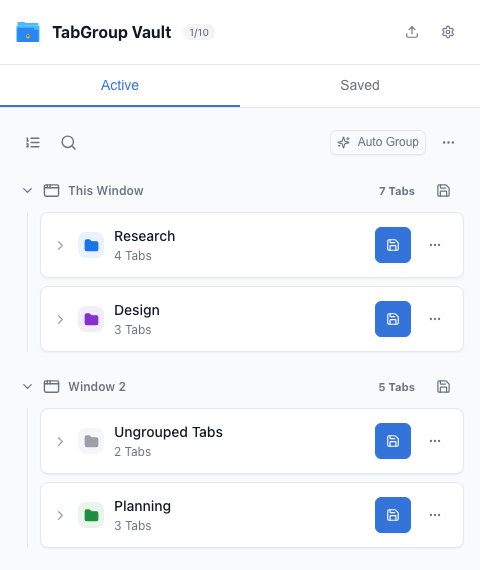
Start in Active. -
Open Auto Group
Review the proposed Groups under each Window. Tabs in separate Windows are not combined into one Group.
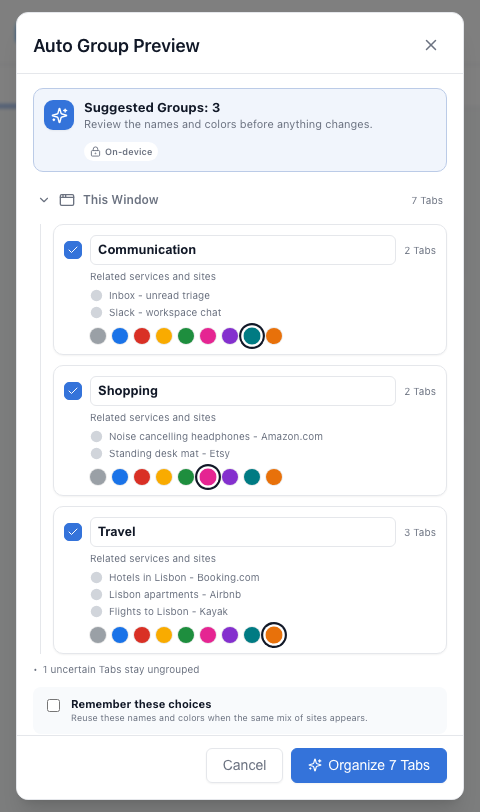
Open Auto Group and review suggestions. -
Adjust the Preview
Rename a suggestion, change its color or deselect it. Collapse Windows to reduce clutter; collapsing does not deselect their Groups.
Choose Groups and colors in the preview. -
Apply the Selection
Apply the checked suggestions. Tabs that moved, closed or changed while the preview was open may be skipped to avoid changing unrelated work.
Apply the selected Groups. -
Review or Undo
Check the new Groups in Active. Use Undo if the result is not useful, then save any Groups you want to keep.
Review the result in Active.