Is OneTab open source?
| Feature | What to Check |
|---|---|
| Tab Manager Plus | Free, open source under MPLv2. The current repository documents open-Tab search, Window saving, and limits on open Tabs. Compare restore behavior using your own sample Group. |
| OneTab | Save Tabs into lists. Its current documentation also describes encrypted cross-browser sync, folders, notes, and tasks. Test exact Chrome Group metadata restoration separately. |
| TabGroup Vault | Save Group backups and whole Sessions. Local data; optional Pro Drive backup and Window-close auto-save. Keep an export outside the Profile. |
Sources Checked October 1, 2026: Tab Manager Plus Source · OneTab · TabGroup Vault Features
OneTab does not appear to be publicly open source. Its official website, Chrome Web Store listing, and Firefox Add-ons page do not link to a public source repository. Firefox also lists a custom license. So if you want code you can inspect, OneTab is probably not the tool to start with.
That does not make OneTab useless. It was one of the first Chrome extensions to tackle Tab overload. Click the extension button and your open Tabs collapse into a single list of links. You can restore Tabs one by one or all at once, and OneTab says this can save up to 95% memory.
OneTab also supports folders, quick lists, search, tasks, and stars. Its help page says encrypted cloud sync and backup are coming soon, so treat OneTab as local browser-storage based unless that feature has actually shipped for your account.
OneTab says Tab URLs are not transmitted to OneTab or others except when you intentionally use "Share as a web page." The trade-off is durability: saved Tabs live in the browser database. OneTab warns that uninstalling the extension deletes stored Tabs. Crashes, sudden power loss, or browser database corruption can rarely cause data loss too.
Is there an official OneTab GitHub repo?
No official GitHub or source repository was found from OneTab's own site or store listings. If you are searching for "OneTab open source official GitHub," use a simple rule: do not assume a public source repo exists unless OneTab links one from a channel it controls.
If you need public source code, start with Tab Manager Plus instead. Its GitHub repository lists an MPLv2 license, and both GitHub and the Chrome Web Store show version 6.0.0.
Why people still look for OneTab alternatives
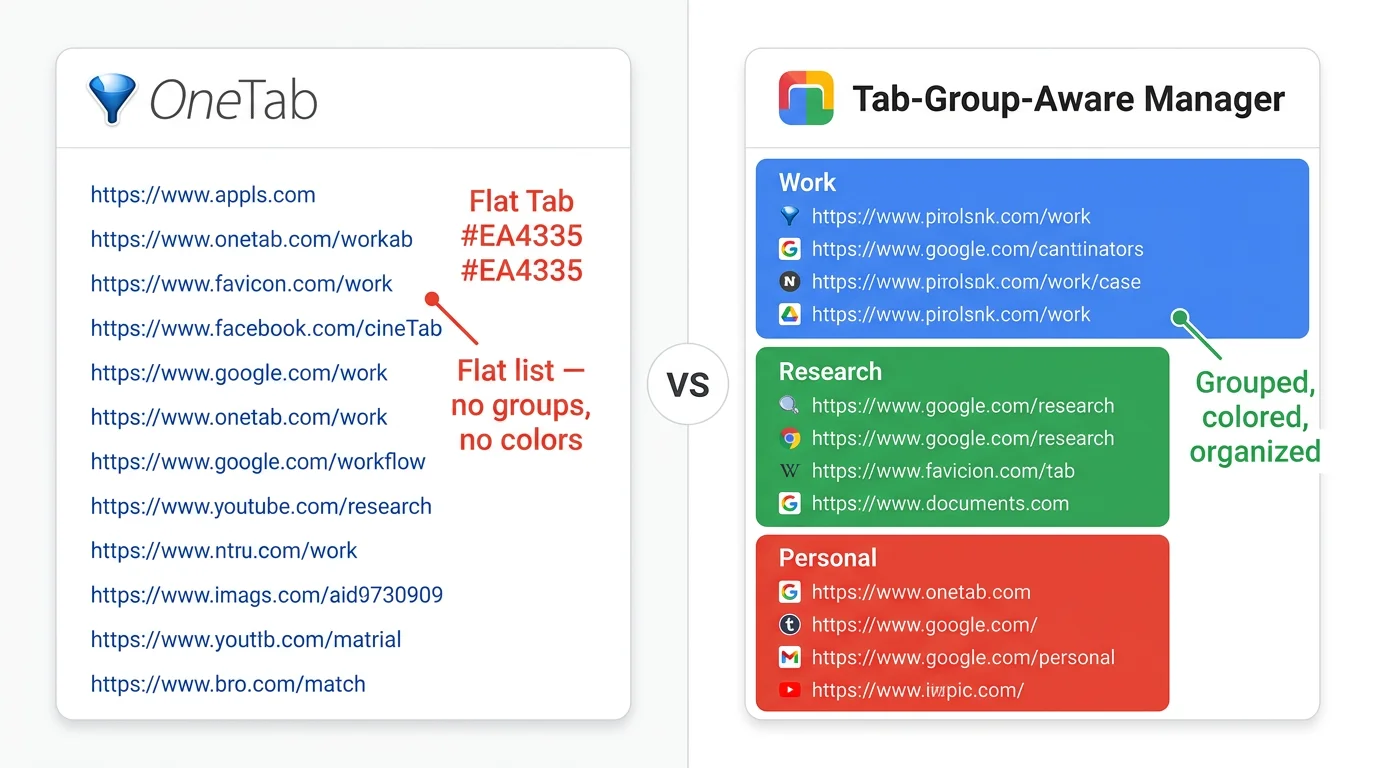
For a long time, OneTab's simple list was enough. Chrome has moved on since then. Native Tab Groups changed how people organize research, projects, and daily work. OneTab still treats Tabs as a flat list, so it does not preserve the color-coded Groups you spent time setting up.
The usual reasons to switch are practical:
- OneTab flattens your carefully organized Groups into a plain list. No Chrome Tab Group awareness.
- Your saved Tabs live in the browser database. Uninstalling OneTab deletes them, and rare browser database corruption can cause data loss.
- You cannot go back to a previous version of your saved Tabs. No snapshot history.
- OneTab says encrypted cloud sync and backup are coming soon, not currently available.
- Some users report lost saved Tabs after updates or profile changes. OneTab's own guidance points to extension storage loss, browser database corruption, Firefox Refresh, privacy cleaners, low disk space, or crashes, so treat those reports as reliability counter-signals rather than proven update bugs.
5 OneTab alternatives worth comparing in 2026
These tools solve different OneTab gaps. Tab Manager Plus is the open-source pick. The others are here for saved Sessions, visual workspaces, or preserving Chrome Tab Groups.
| Feature | What to Check |
|---|---|
| TabGroup Vault | Save Group backups and whole Sessions. Local data; optional Pro Drive backup and Window-close auto-save. Keep an export outside the Profile. |
| Session Buddy | Session and Window organization with automatic local backups. Native Chrome Group support remains on its roadmap. Cloud collections have a separate rollout and plan. |
| Tab Session Manager | The current developer listing includes Chrome/Firefox Group saving, automatic saves, and optional cloud sync. Chrome Group saving no longer requires a companion extension. |
| OneTab | Save Tabs into lists. Its current documentation also describes encrypted cross-browser sync, folders, notes, and tasks. Test exact Chrome Group metadata restoration separately. |
| Workona | Project spaces with resources, notes, and tasks. Tab management must be enabled; it documents Session backups and cross-device use. Check current plans instead of assuming a fixed monthly price. |
| Toby | Visual link collections and shared Spaces with account sync. Its current plans include Session saving. Collection organization is not evidence of identical Chrome Group metadata restoration. |
| Tab Manager Plus | Free, open source under MPLv2. The current repository documents open-Tab search, Window saving, and limits on open Tabs. Compare restore behavior using your own sample Group. |
Sources Checked October 1, 2026: TabGroup Vault Features · Session Buddy Roadmap · Session Buddy Backups · Session Buddy Cloud Plans · Tab Session Manager · OneTab · Workona Tab Manager · Toby · Tab Manager Plus Source
1. TabGroup Vault, for Chrome Tab Group users
TabGroup Vault at a glance · ★ 4.6 stars · over 1,000 weekly active users
Price: Free (10 snapshots) / $39 one-time lifetime Pro
Best for: Users who rely on Chrome Tab Groups and want reliable backup and restore
Main feature: Saves and restores Tab Group structures including names, colors, and Tab order
TabGroup Vault was built for Chrome's Tab Groups. Where OneTab sees a list of URLs, TabGroup Vault sees the workspace you already arranged: Group names, color coding, and Tab order.
Saving takes one click and creates a snapshot of your current Tab Groups. Restoring also takes one click. It rebuilds those Groups with the right names, colors, and Tabs inside each Group. OneTab cannot do that.
The free tier gives you 10 snapshots, enough to test the workflow. Pro is a one-time $39 payment for unlimited snapshots, Google Drive backup, auto-save on close, and support for up to five Chrome profiles. No subscription.
2. Session Buddy, for free local Session saving
Session Buddy is built around Sessions. Its Chrome listing shows version 4.1.2, updated April 28, 2026, with 1,000,000 users. It automatically logs your browser Sessions over time, giving you a history of which Windows and Tabs were open at different points. You can also name and save Sessions manually, then restore them later.
The appeal is simple: Session Buddy is free and has been around for years. The limitation is that it thinks in Windows, not Tab Groups. Restore a Session and your Tabs come back in the right Windows, but Tab Group structure may be lost or only partly preserved.
Session Buddy is local-first and does not sync today, with future opt-in cloud storage described by the product. It is a strong choice if you do not use Tab Groups and just want a dependable way to save and restore your open Tabs. For broader Session-saving options, see Tab Session Manager.
3. Workona, for heavy workspace users
Workona replaces your Tab workflow with its own workspace model. Each workspace holds Tabs, docs, and links that you can switch between. Its Chrome listing verifies cloud spaces, auto-save, sync, Tab suspension, and security positioning.
Workona's strength is the workspace model plus cloud sync. The trade-off is cost and complexity: it is a paid cloud workspace product, not a simple open-source OneTab replacement.
Workona makes sense if you want a full workspace management platform. It is overkill if you just want to save and restore Tab Groups.
4. Toby, for visual organizers
Toby replaces your Chrome new Tab page with a visual dashboard of saved Tab collections. You drag and drop Tabs into labeled columns, building a board of links by project or topic. Its Chrome listing shows version 1.13.1, updated June 3, 2026, with 300,000 users.
Toby works well for people who think spatially. It has cloud sync, AI features, and in-app purchases, but it also takes over your new Tab page. That can feel heavy if you just wanted a quieter OneTab replacement. Toby also uses its own system instead of Chrome's native Tab Groups.
If you prefer a visual drag-and-drop interface and do not mind a custom new Tab page, Toby is worth trying. Toby's Starter plan is free up to 60 saved Tabs. Productivity is $6/month per member, or $4.50/month billed yearly, and Team is $10/month per member, or $8/month billed yearly. For the full breakdown, read Toby vs OneTab.
5. Tab Manager Plus, for open-source real-time Tab control
Tab Manager Plus goes in a different direction. Instead of saving Tabs for later, it gives you a real-time popup view of every open Tab across all Windows. You can search, filter, rearrange, and close Tabs from one panel.
It is useful for people who keep dozens of Tabs open and need faster navigation right now. It is not a direct OneTab-style backup replacement, though. Think of Tab Manager Plus as a better Tab overview and saved-Window tool, not a full Session history system.
Tab Manager Plus is free and open source. Its GitHub repository lists an MPLv2 license, and GitHub and the Chrome Web Store both show version 6.0.0. If your main requirement is public source code, this is the cleanest fit in the comparison. For a deeper breakdown, read TabGroup Vault vs Tab Manager Plus.
How to choose the right OneTab alternative
Start with the job you need the extension to do:
Cost comparison: OneTab alternatives
Price matters for a tool you will use every day. The plain version, with unverifiable Workona pricing left out:
Migration tip
Switching from OneTab does not have to be abrupt, but back up first. Export your OneTab data before uninstalling, reinstalling, refreshing the browser, or changing profiles. Then install your new tool alongside OneTab, test it for a week, and migrate once you trust it.
What about OneTab's strengths?
OneTab still has some things going for it. It is free, simple, and focused. Its Chrome listing shows version 2.14, updated March 22, 2026, with 2,000,000 users and a 4.5 rating from 14.6K ratings.
If all you need is to collapse Tabs into a list and reopen them later, and you do not use Tab Groups, OneTab still works for that narrow use case. The alternatives become more interesting when you need public source code, Group awareness, currently available cloud backup, snapshot history, or a cleaner workflow.
Final verdict
OneTab does not appear to be publicly open source, and its official listings do not link to a GitHub or source repo. It still works for quick Tab cleanup, but the right replacement depends on what problem pushed you away from it.
If you want an open-source OneTab alternative, start with Tab Manager Plus. If you rely on Chrome Tab Groups, TabGroup Vault is the better fit. For free local Session saving, Session Buddy remains practical. For visual workspace management, compare Toby vs OneTab before committing to a new-Tab workspace.
Pick the one that matches the problem you actually have, install the free version, and give it a real week of use. You will know pretty quickly if it fits.