Short answer: Workona is good for project workspace management
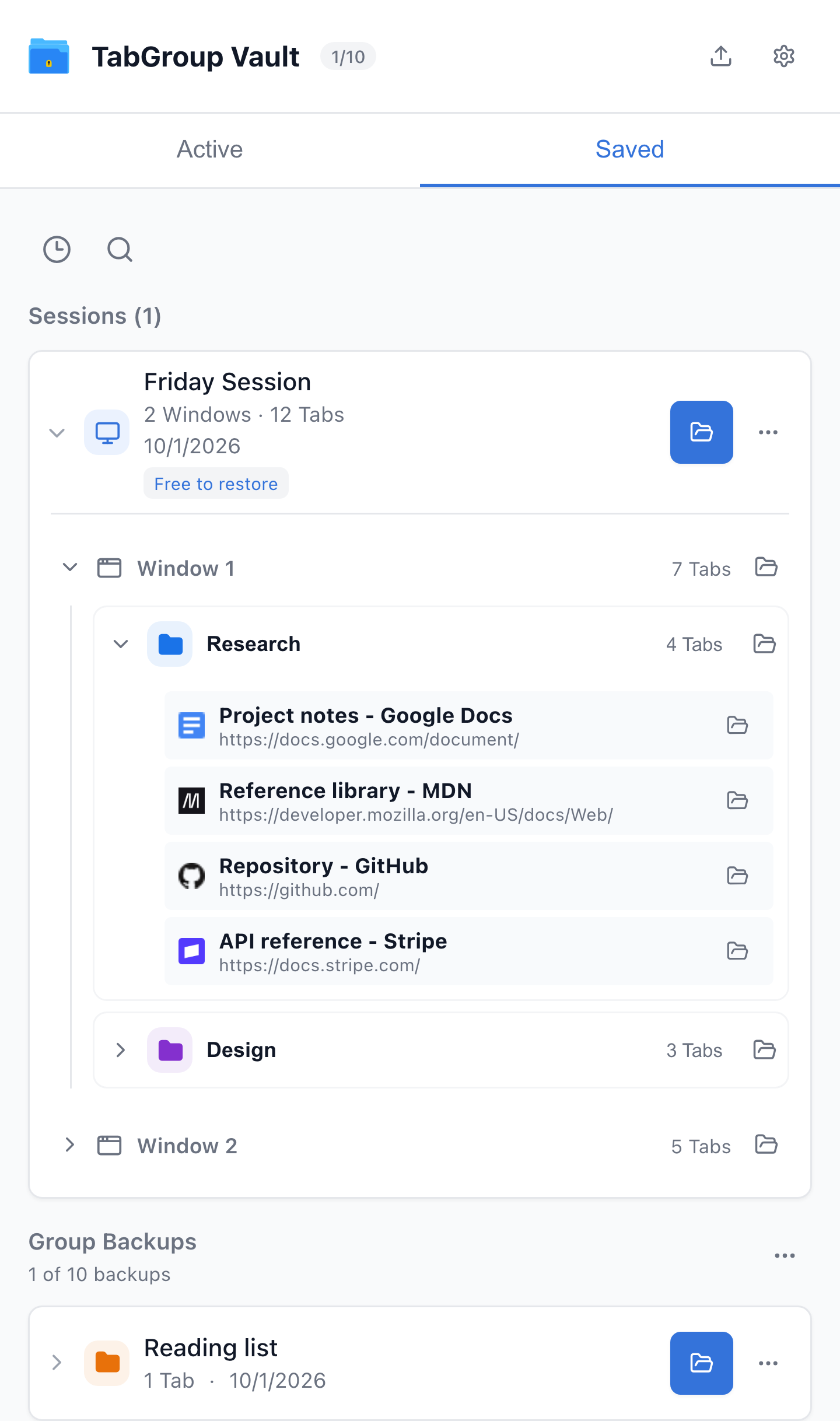
Current TabGroup Vault Saved Session view with deterministic sample data. This capture demonstrates the interface, not a live cloud or crash-recovery test.
| Feature | What to Check |
|---|---|
| Workona | Project spaces with resources, notes, and tasks. Tab management must be enabled; it documents Session backups and cross-device use. Check current plans instead of assuming a fixed monthly price. |
| TabGroup Vault | Save Group backups and whole Sessions. Local data; optional Pro Drive backup and Window-close auto-save. Keep an export outside the Profile. |
Sources Checked October 1, 2026: Workona Tab Manager · Workona Plans · TabGroup Vault Features
Yes. Workona makes sense when you want workspace management around projects. Think of it as a project workspace organizer: spaces collect links, files, notes, tasks, and, when Tab management is enabled, Tabs.
TabGroup Vault solves a narrower problem. It works with Chrome's native Tab Groups and focuses on deliberate snapshots, restore history, local-first storage, optional Google Drive backup, and support for multiple Chrome profiles. It stays out of the project-hub business.
That difference matters. Choose Workona when you want a workspace system around projects. Choose TabGroup Vault when your workflow already runs on Chrome Tab Groups and you want better backup, recovery, and control.
How Workona organizes work
Workona's main unit is a space. A space can hold the Tabs, links, files, notes, tasks, sections, and resources for a project or work context. For browser-heavy work, that maps neatly to real life.
Tab management is optional and has to be enabled. When it is on, Workona spaces work like project-specific browser Windows: Tabs are autosaved, closed when a space is closed, and restored when the space is reopened. Search can span Tabs, docs, and resources, which is handy when your project context is split across browser Tabs and cloud documents.
Sync is part of the appeal, with one caveat worth understanding. Workona opens the most recent Tab Session for a space across devices and supported browsers. If the same space is open on multiple computers, Workona prompts with changes from the other computer and lets you apply, exclude, or ignore them because a space has one primary Session.
The trade-off is that you are adopting Workona's workspace model. If you want your browser organized around Workona spaces, that is the point. If you want Chrome Tab Groups to stay in charge, Workona may feel like more structure than you need.
Workona evaluation checklist
Use this checklist before choosing Workona for workspace management or workflow organization:
- Workspace switching: Do you want each project, client, class, or research area to open as its own space?
- Project resources: Do files, links, and saved resources belong beside your active Tabs?
- Notes and tasks: Do you want lightweight project notes and next actions inside the same workspace?
- Team sharing: Will other people need the same workspace resources?
- Cross-device sync: Are you comfortable with one most recent Tab Session per space and conflict prompts when another computer changes it?
- Plan limits: Do you need Pro features such as unlimited spaces, unlimited sections, 90-day Session backups, space integrations, or space templates?
- Cloud comfort: Are you comfortable with Workona storing spaces in the cloud for backup and access?
- Chrome Tab Groups: Should native Chrome Tab Groups stay in charge, or are you ready to organize around Workona spaces?
Workspace management comparison
| Feature | What to Check |
|---|---|
| Workona | Project spaces with resources, notes, and tasks. Tab management must be enabled; it documents Session backups and cross-device use. Check current plans instead of assuming a fixed monthly price. |
| TabGroup Vault | Save Group backups and whole Sessions. Local data; optional Pro Drive backup and Window-close auto-save. Keep an export outside the Profile. |
Sources Checked October 1, 2026: Workona Tab Manager · Workona Plans · TabGroup Vault Features
| Feature | What to Check |
|---|---|
| One-Time or Recurring | TabGroup Vault offers a free tier and an optional one-time Pro purchase. Competitor plans differ by billing cycle, seats, limits, and features. |
| Compare Like for Like | For a recurring plan, calculate the published rate × months × seats, and include taxes or add-ons. Verify the chosen plan before comparing a three-year total; do not use an unverified monthly price. |
Sources Checked October 1, 2026: TabGroup Vault Features · Workona Plans · Toby Plans
Pricing model
Pricing is one of the clearer differences between the two tools.
- Workona offers Free, Pro, Team, and Enterprise plans. Current listed Pro features include unlimited spaces, unlimited sections, 90-day Session backups, space integrations, and space templates.
- TabGroup Vault has a free tier with 10 snapshots and a $39 one-time lifetime Pro purchase.
Check Workona's pricing page for current dollar pricing. The real comparison is the model: Workona's paid features are subscription-based, while TabGroup Vault's Pro features are sold once.
Plan fit
If your workflow depends on Workona's paid features, check the current plan limits and pricing before moving your workspace system there. If you only need Tab-Group backup and restore, TabGroup Vault's one-time model is simpler.
Where Workona wins
Workona covers more of the project workflow. TabGroup Vault leaves these jobs alone:
Workspace management
Workona is built around spaces, which suits people who switch between projects, clients, classes, or research areas throughout the day. Spaces can hold Tabs plus the resources around them, so the workspace becomes more than a saved Tab list.
Notes and tasks
Workona can include notes and tasks within each workspace. That keeps next actions near the Tabs and resources they depend on. TabGroup Vault does not have task management features.
Team features
Workona allows teams to share workspaces, which works well when several people need the same set of resources. TabGroup Vault is a personal tool and does not include team sharing.
Doc and resource hub
Beyond live Tabs, Workona lets you save links, files, notes, tasks, and other resources to each workspace. It becomes a project dashboard rather than a plain Tab manager. That can be the right shape if you want the project context and the Tabs in one place.
Cross-browser workspace access
Workona's browser extensions are supported for Chrome, Firefox, and Microsoft Edge. Workona's web app works in Safari, while Safari extension support is listed as planned. That matters if your workspace needs to follow you beyond one Chrome profile.
When Workona is the right choice
If you need workspace switching, team sharing, notes/tasks, search, resources, and a project-hub approach to browser management, Workona is the better bet.
Where TabGroup Vault wins
Native Tab Group integration
TabGroup Vault works with Chrome's built-in Tab Groups instead of replacing them with a proprietary system. If you have organized your Tabs into named, color-coded Chrome Groups, TabGroup Vault preserves that structure. Workona uses its own workspace concept, so Chrome Tab Groups are not the main unit.
Snapshots and restore control
Chrome Help says Tab Group changes are automatically saved and synced across devices when browsing history and Tabs are synced with the same Google Account. Closed Groups are saved in the bookmarks bar or menu and can be reopened. TabGroup Vault adds a more deliberate layer on top: user-created snapshots, restore history, backup/export control, and Chrome-native Group preservation.
That extra layer matters when you want to capture a known-good state before a big research Session, recover an older setup, or move a saved Group workflow between Chrome profiles.
Privacy and data control
TabGroup Vault stores your data locally by default. If you enable cloud backup, it goes to your own Google Drive account, not to a third-party server. You own your data and can access it directly in Drive.
Workona stores spaces in the cloud for backup and access. That supports cross-device sync and team sharing, but it also means workspace contents, including Tab URLs, are stored outside your device.
Simplicity
TabGroup Vault's workflow is two actions: save (take a snapshot) and restore (rebuild your Groups). There is almost no learning curve. Workona asks you to understand workspaces, sections, resources, and how switching contexts affects your open Tabs. You get more scope, but you also get more concepts to learn.
Some community users report missing Tabs, sync confusion, or performance concerns with Workona or Chrome Tab-Group behavior. Treat that as a reason to test critical workflows before migrating, not as proof that Workona's autosave, restore, backups, or sync fail by default.
One-time pricing
After the initial $39 purchase, TabGroup Vault does not charge again. No renewal emails, no price increases, no recurring decision about whether the subscription is still worth it. Workona requires ongoing payment for ongoing access to Pro features.
Privacy comparison
Tab data is more personal than it looks. It can reveal what you research, what you buy, what you read, where you bank, and what you work on.
TabGroup Vault: Data stays on your device by default. Cloud backup goes to your personal Google Drive and is encrypted in transit. No data is sent to TabGroup Vault's servers. No analytics on your browsing habits.
Workona: Spaces are stored in the cloud for backup and access. That supports cross-device sync and team sharing, but it means your workspace contents, including Tab URLs, are stored outside your device.
Neither approach is wrong, but they reflect different trade-offs between convenience and privacy.
TabGroup Vault quick facts
Price: Free (10 snapshots) / $39 one-time lifetime Pro
Data: Local-first, optional Google Drive backup
Focus: Save and restore Chrome Tab Groups
Profiles: Up to 5 Chrome profiles supported
Who should choose what
Choose Workona if:
- You need a full workspace management platform, not just Tab backup
- You work in teams and need shared workspaces
- You want notes/tasks, search, docs, and resource linking
- You are comfortable with cloud storage for workspace backup/access and subscription pricing
Choose TabGroup Vault if:
- You use Chrome's native Tab Groups and want snapshots, restore history, and backup control
- You prefer one-time pricing over subscriptions
- You value privacy and want local-first or Drive-based storage
- You want a focused tool rather than a full workspace platform
- You use multiple Chrome profiles
Related alternatives
Different Tab tools solve different jobs. This comparison stays focused on Workona's workspace model. For narrower TabGroup Vault comparisons, see TabGroup Vault vs OneTab, TabGroup Vault vs Session Buddy, TabGroup Vault vs Tab Manager Plus, and TabGroup Vault vs Toby.
Bottom line
Workona and TabGroup Vault overlap around browser organization, but they answer different questions. Workona is for users who want a workspace hub around projects, resources, notes/tasks, sharing, search, and synced spaces. TabGroup Vault is for users who rely on Chrome's native Tab Groups and want a private, focused way to snapshot, back up, and restore them.
If you are unsure, ask what the browser is organizing. Projects with Tabs, docs, tasks, and teammates point toward Workona. Named, color-coded Chrome Tab Groups that you want to protect and restore on your terms point toward TabGroup Vault.