What Is a Second Brain?
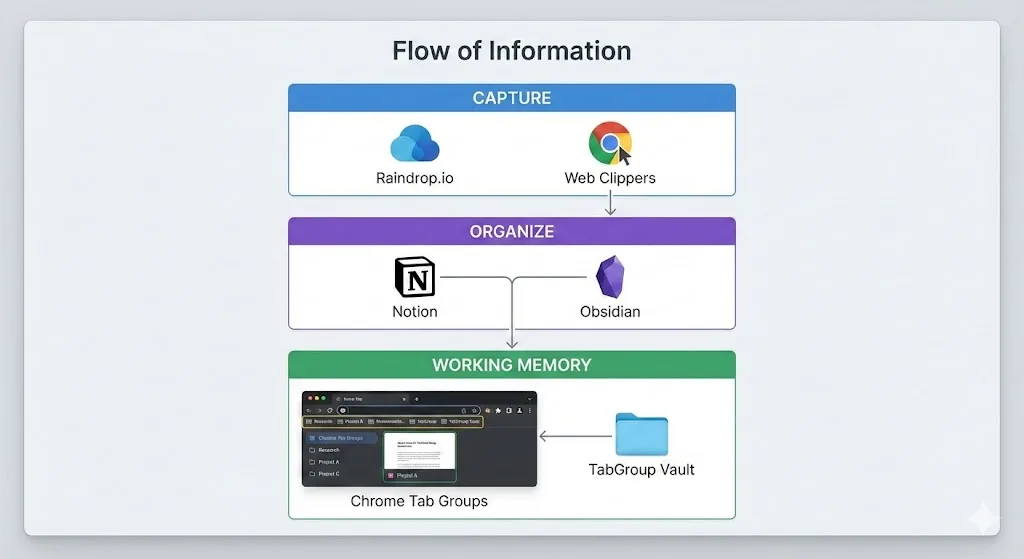
The "second brain" concept comes from the personal knowledge management (PKM) community. The idea is to offload information from your biological memory into an external system. Instead of trying to remember everything, you create a structured repository of notes, references, and ideas that you can search and retrieve when needed.
Most second brain discussions focus on note-taking apps: Notion, Obsidian, Roam Research, Logseq. These are important. But they only cover part of the picture. Your second brain also needs a way to handle the messy, in-progress information that lives in your browser tabs right now.
Think about it this way: Notion is your long-term memory. Your browser tabs are your working memory. And just like biological working memory, your browser tabs are volatile. They disappear when you close them, crash, or run out of patience with the clutter. A complete second brain system needs to address both.
The Three Layers of a Browser-Based Second Brain
A practical second brain built around the browser has three distinct layers, each served by different tools:
Layer 1: Capture -- Saving What You Find
The capture layer is about getting information out of the web and into your system before it is lost. This includes articles you want to read later, references you might need, and anything that catches your attention during browsing.
The tools for this layer need to be fast and frictionless. If saving something takes more than two clicks, you will not do it consistently.
- Raindrop.io: A modern bookmarking tool that lets you save, tag, and organize web pages into collections. Unlike Chrome bookmarks, Raindrop.io saves a cached copy of pages, supports full-text search, and has a visual interface that makes collections browsable. The Chrome extension adds a one-click save button.
- Notion Web Clipper: Saves web pages directly into your Notion workspace. Good if Notion is already your primary note-taking tool, since clipped content lives alongside your notes.
- Pocket: A dedicated read-later service. Clean reading interface, offline access, and tagging. Best for long-form articles you want to read without distraction.
Layer 2: Organize -- Structuring for Retrieval
Raw captures are useless if you cannot find them when you need them. The organize layer is where you add structure, create connections between ideas, and build a searchable knowledge base.
- Notion: The most popular choice for structured knowledge bases. Databases, linked pages, templates, and a powerful search make it ideal for organizing project notes, meeting records, and reference libraries. The block-based editor handles everything from simple lists to complex relational databases.
- Obsidian: A local-first note-taking app that uses plain Markdown files. Its strength is in linking notes together with bidirectional links and visualizing your knowledge graph. Preferred by people who want to own their data and explore connections between ideas.
- Logseq: An outliner-based tool that combines daily journaling with linked knowledge. Good for people who think in bullet points and want automatic daily structure.
Layer 3: Working Memory -- Active Thinking in the Browser
This is the layer that most second brain systems ignore. When you are actively working on something -- researching, comparing, writing, analyzing -- your browser tabs represent your current working set. These are not bookmarks. They are not notes. They are the live, in-progress materials you are thinking with right now.
The tools for this layer need to preserve state and support context switching:
- Chrome Tab Groups: Visual organization of your active tabs by topic or project. Color-coded, collapsible, and built into Chrome.
- TabGroup Vault: Saves the state of your tab groups as snapshots. This is what makes your working memory persistent. You can save your current working context, close it, do something else, and restore it later.
TabGroup Vault
The working memory layer of your second brain. Save and restore Chrome tab groups with one click. Free: 5 snapshots. Pro ($29 one-time): unlimited snapshots, bulk restore, Google Drive backup, 5 Chrome profiles, dark theme.
How the Layers Work Together
The real power of a browser-based second brain emerges when the three layers work as a pipeline:
- You browse and discover. Tabs accumulate as you explore a topic.
- You capture the keepers. Anything worth saving long-term goes into Raindrop.io or Notion via their web clippers.
- You organize in your knowledge base. During a dedicated review session, you process your captures: add notes, tag them, link them to relevant projects in Notion or Obsidian.
- You save your working state. Before switching tasks, save a tab group snapshot in TabGroup Vault. This preserves the live context that is not yet captured or organized.
- You restore and continue. When you come back to the topic, restore the snapshot and pick up where you left off. The tabs you already processed can be closed. New tabs can be added.
The snapshot sits between "raw browsing" and "organized knowledge." It is the bridge that prevents information from falling through the cracks during the transition from discovery to storage.
Building the System: A Practical Setup
Here is a concrete setup you can implement in 30 minutes:
| Layer | Tool | Chrome Extension | Purpose |
|---|---|---|---|
| Capture | Raindrop.io | Raindrop.io extension | One-click save of web pages with tags |
| Organize | Notion or Obsidian | Notion Web Clipper (or Obsidian Web Clipper) | Long-term knowledge base with notes and links |
| Working Memory | Chrome Tab Groups + TabGroup Vault | TabGroup Vault | Save and restore active research contexts |
Step 1: Set Up Your Capture Tool
Install Raindrop.io (or your preferred bookmarking tool) and create 5-10 collections that map to your main areas of interest or responsibility. Keep the structure simple. You can always add more collections later. The goal is to have an obvious place for anything you want to save.
Step 2: Set Up Your Knowledge Base
If you use Notion, create a "Knowledge Base" database with properties for topic, source URL, date captured, and status (unprocessed, reading, processed). Install the Web Clipper extension. If you use Obsidian, set up a "Web Captures" folder and install the Obsidian Web Clipper extension.
Step 3: Set Up Your Working Memory
Create Chrome tab groups for your 2-3 most active projects or areas of focus. Install TabGroup Vault and save your first snapshot. This is your baseline working state.
Step 4: Establish a Processing Rhythm
Once a week (or once a day if you capture a lot), review your Raindrop.io saves and your tab group snapshots. Process unread captures into your knowledge base. Clean up tab groups by closing tabs that have been captured elsewhere and saving fresh snapshots.
The Working Memory Gap
Most PKM enthusiasts focus obsessively on the long-term storage layer (Notion databases, Obsidian graphs, Zettelkasten methods) and neglect the working memory layer. This creates a common frustration: you have a beautifully organized knowledge base, but your daily browser experience is still chaotic.
The reason is that knowledge work does not happen inside Notion. It happens in the browser. You read articles in the browser. You compare sources in the browser. You look up documentation in the browser. The browser is where the active thinking happens. Notion is where the results get stored.
TabGroup Vault fills this gap by making your browser's active state as persistent and manageable as your notes. A snapshot is not a bookmark and not a note. It is a saved working context: the exact set of tabs you had open, organized the way you had them, ready to be restored when you need that context again.
Second Brain Workflows for Different Roles
The three-layer system adapts to different roles and workflows:
- Researchers: Heavy capture and organize layers. Tab groups by research thread, snapshots for literature review sessions. Knowledge base structured by paper, topic, or research question. See our guide to academic research tools for details.
- Developers: Lightweight capture, heavy working memory. Tab groups by project, snapshots for context switching between codebases. Knowledge base for code snippets, architecture decisions, and learning notes. See Chrome for developers.
- Writers and Content Creators: Balanced across all three layers. Capture for research and inspiration. Knowledge base for topic outlines and reference materials. Tab group snapshots for active writing projects.
- Students: Capture for course readings. Knowledge base for study notes. Tab group snapshots per course or assignment. See our student productivity tools guide.
Common Pitfalls
Building a second brain can itself become a productivity trap if you are not careful. Watch out for these:
- Over-engineering the system. If you spend more time organizing your knowledge base than using it, simplify. A flat list of tagged items is often more useful than a complex hierarchy.
- Capturing everything. Not everything deserves to be saved. If you would not search for it in six months, do not capture it. Let it live as a tab and die when you close it.
- Ignoring the working memory layer. A second brain without active context management is like a library without a reading room. You need a place to spread materials out and work with them, not just store them.
- Tool hopping. Pick one tool per layer and commit for at least three months. Switching tools every week means you never build enough content in any one system for it to become useful.
The 10-Minute Weekly Review
Every week, spend 10 minutes on your second brain: close stale tabs, save updated snapshots, process any unread captures in Raindrop.io or Notion. This prevents the system from becoming stale and keeps your working memory current.
Starting Small
You do not need all three layers from day one. Start with just the working memory layer: Chrome tab groups and TabGroup Vault. Get comfortable saving and restoring your working contexts. Once that becomes a habit, add a capture tool. Once you have enough captures to warrant organization, add a knowledge base.
The second brain is a system that grows with your needs, not a system you install all at once. The browser is where you already spend your time. Making it work as the active layer of your personal knowledge system is the highest-leverage starting point.