Does Firefox use less RAM than Chrome?
Yes, in our May 2026 loaded-tab benchmark, Firefox used less RAM than Chrome at 30 and 50 tabs. Chrome used less at idle, and 10 tabs was close. The caveat: this was one first-party benchmark on an Apple M4 Pro Mac, with all tested tabs loaded and allowed to settle.
So Firefox won the heavy loaded-tab case in this test. It will not always use less RAM on every laptop, page set, extension stack, or long-idle browser session.
Test scenarios and what matters
Raw numbers without context do not help much. Four scenarios matter most:
- Idle. Browser open, one blank tab, nothing loaded. Baseline overhead.
- Light work. 5 to 10 regular content tabs (articles, docs, dashboards).
- Heavy-tab. 30 to 60 content tabs with a mix of active and background.
- Heavy-app. 5 to 10 tabs of web apps: Google Meet, Figma, Linear, a Slack workspace.
The benchmark below uses one repeatable macOS run rather than borrowed ranges. The hardware, profile setup, URL list, and measurement method are all spelled out, so the result has a shape instead of just a number.
Benchmark: Chrome vs Firefox vs Edge RAM (May 2026)
I ran the RAM benchmark on May 4, 2026 using macOS 26.2 (build 25C56), an Apple M4 Pro, and 24 GB of RAM. Each browser used a fresh profile for every checkpoint, with no extensions installed in the benchmark profile.
The test opened the same 50-url set across news, reference, developer, search, and media-heavy pages. Firefox tabs were opened one at a time because its multi-URL command-line launch did not reliably load larger batches. RAM is resident memory (RSS) summed across every browser process matching the benchmark profile path after the tabs were visually checked and allowed to settle.
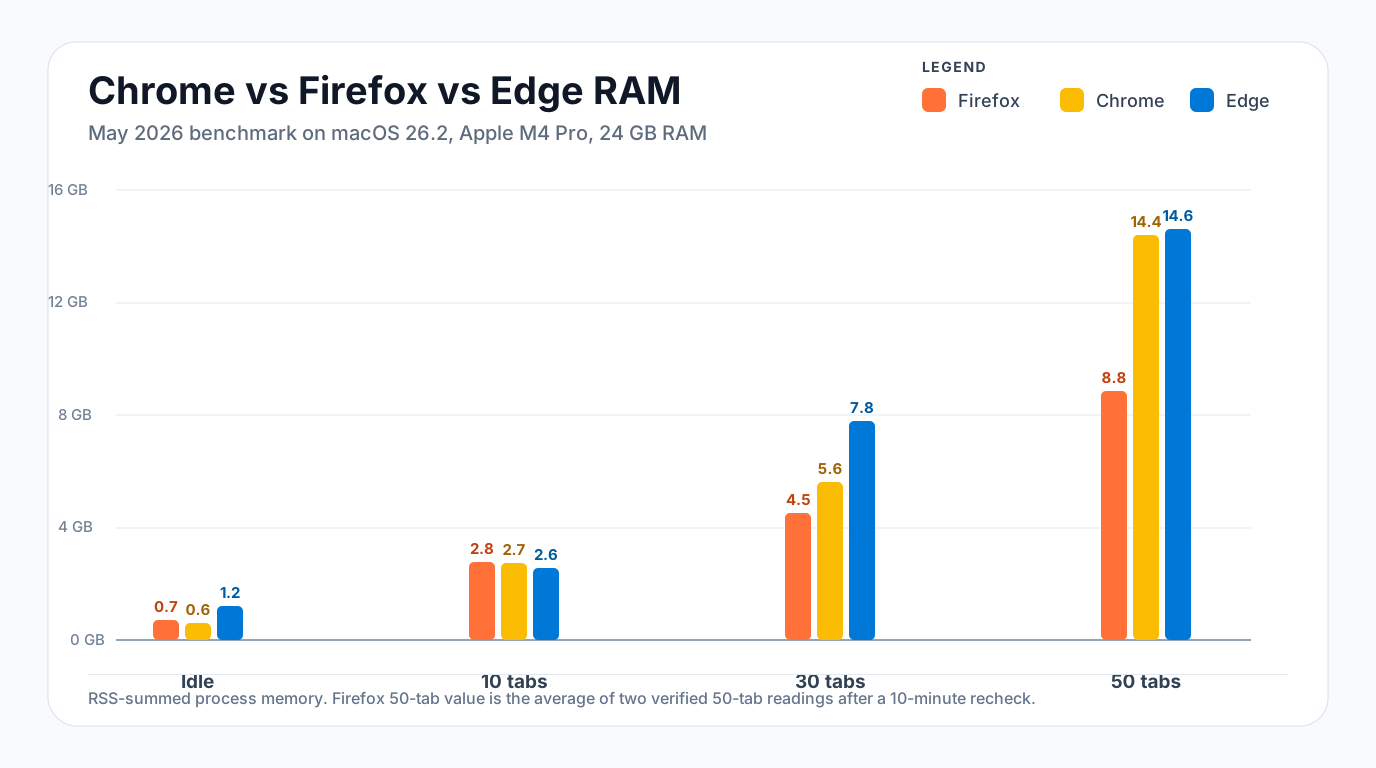
| Browser | Idle | 10 tabs | 30 tabs | 50 tabs |
|---|---|---|---|---|
| Firefox | 727 MB | 2,782 MB | 4,515 MB | 8,844 MB |
| Chrome | 612 MB | 2,730 MB | 5,632 MB | 14,414 MB |
| Edge | 1,211 MB | 2,561 MB | 7,797 MB | 14,611 MB |
Benchmark JSON:
{
  "hardware": {"macos": "26.2", "cpu": "Apple M4 Pro", "ram_gb": 24},
  "results": [
    {"name":"Firefox","idle":727,"t10":2782,"t30":4515,"t50":8844},
    {"name":"Chrome","idle":612,"t10":2730,"t30":5632,"t50":14414},
    {"name":"Edge","idle":1211,"t10":2561,"t30":7797,"t50":14611}
  ]
}- Firefox had the lowest 30-tab and 50-tab footprint in this run. The 50-tab value is the average of two verified readings: 9,081 MB and 8,607 MB after a 10-minute recheck.
- Chrome was leanest at idle, then climbed sharply at 50 tabs. It went from 612 MB idle to 14,414 MB with all 50 pages loaded.
- Edge was close to Chrome at 50 tabs, but heavier at idle and 30 tabs in this loaded-tab run. Edge Sleeping Tabs can change long-idle measurements after background tabs are put to sleep. Edge puts inactive tabs to sleep after 1 hour by default, with settings from 30 seconds to 12 hours.
- The workload changes the answer. At 10 tabs all three browsers clustered within 221 MB; at 50 tabs the Chromium browsers used roughly 5.6 GB more than Firefox on this machine.
How to interpret these results
Idle does not predict heavy-tab behavior
Chrome was the lightest browser at idle in this benchmark, but that did not carry through to 30 or 50 tabs. Idle memory mostly reflects startup services, helper processes, and the blank tab itself. Once real pages load, the page mix matters more than the idle baseline.
At 10 tabs, the difference was small
The 10-tab checkpoint was close enough to be a practical tie: Firefox used 2,782 MB, Chrome used 2,730 MB, and Edge used 2,561 MB. A 221 MB spread shows up in a table, but it is unlikely to decide browser choice on a 16 GB or 24 GB machine.
At 30 and 50 tabs, page weight dominates
The gap widened once the workload included dozens of modern pages with scripts, ads, images, and background activity. Firefox stayed lower in this specific 30-tab and 50-tab run. Chrome and Edge, both Chromium-based, rose sharply at 50 tabs after all pages were loaded and verified.
Memory saver features can change the picture later
Chrome's Memory Saver can free memory from inactive tabs and reload them when you return. Firefox has its own inactive tab unloading behavior when system memory is low. That means a snapshot taken immediately after loading 50 tabs can differ from a snapshot taken after the same tabs sit unused for an hour.
Why Firefox vs Chrome RAM results vary
Your result may differ because browser memory is not just the browser binary. Page mix, extensions, active media, background scripts, long-running sessions, operating-system memory pressure, and inactive-tab settings all change browser memory behavior.
Heavy or buggy web apps can also distort comparisons. A single media or collaboration tab can use more memory than several simple article tabs, and a page-specific issue can make any browser look worse than it normally is.
Treat this benchmark as one measured loaded-tab workload, not a permanent ranking for every machine.
Measured, not universal
These numbers come from one Apple M4 Pro Mac on May 4, 2026. The method is explicit, but the numbers are not portable truths. Different pages, extensions, operating systems, memory pressure, and browser settings can change the winner.
How tab features change the result
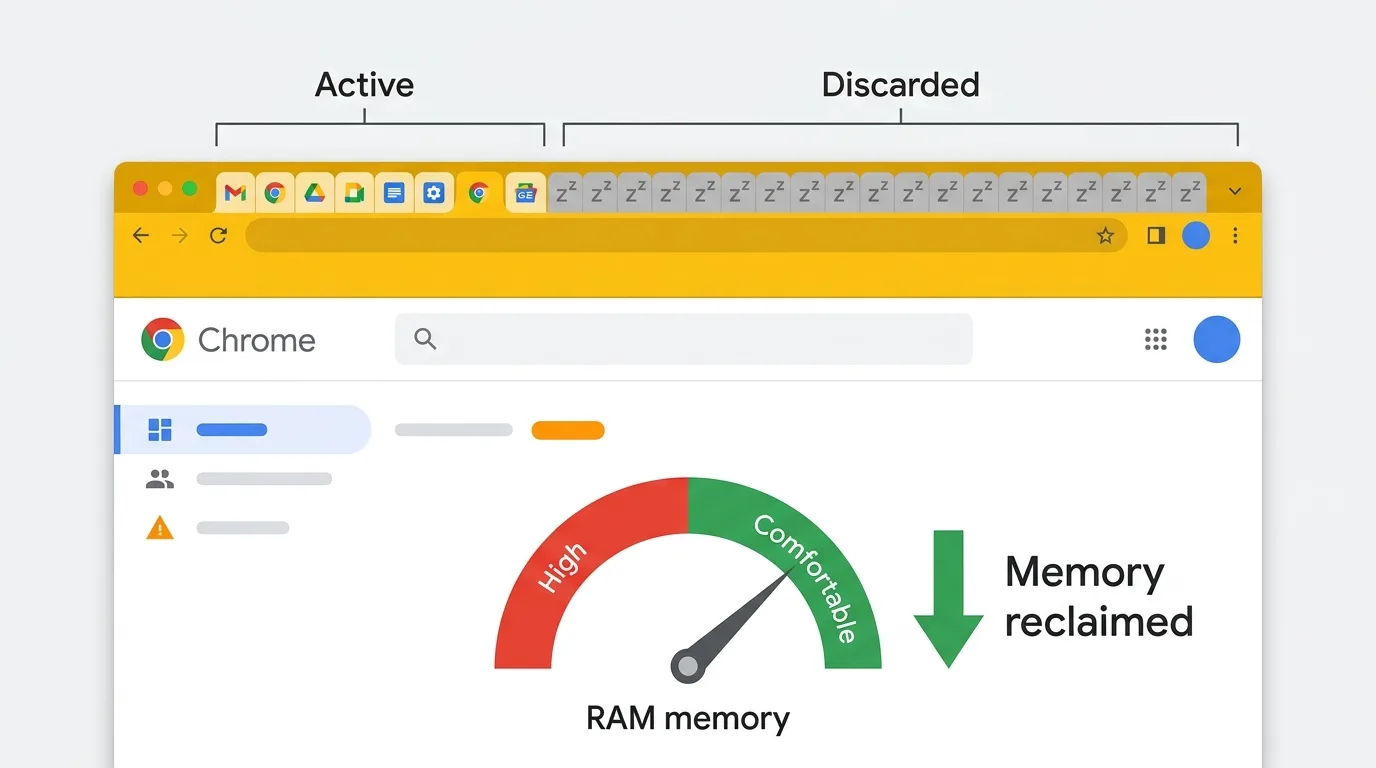
Chrome's Memory Saver
Chrome can deactivate inactive tabs automatically. Deactivated tabs stay on the tab bar and reload when focused. Google now gives Memory Saver three settings: Moderate, Balanced (recommended), and Maximum, so you can trade memory savings for responsiveness.
Chrome may keep some tabs active instead of deactivating them, including tabs with active audio or video, screen sharing, notifications, downloads, partially filled forms, pinned tabs, or connected devices.
Memory Saver can lower Chrome's RAM use after inactive tabs are discarded. The amount depends on page mix, settings, memory pressure, and idle time. It does not mean Chrome will always beat Firefox in a fully loaded tab benchmark.
Firefox tab unloading
Firefox can unload inactive tabs when system memory is low. The about:unloads page shows unload priority and lets you manually unload tabs for inspection or troubleshooting.
Both browsers can remove inactive tab contents from memory, but the controls differ. Chrome's Memory Saver is a user-facing inactive-tab setting with timing modes. Firefox's automatic unloading is primarily triggered by low-memory pressure. That is why RAM comparisons need a specific method, not a single browser ranking.
Chrome tab groups
Chrome tab groups work well with Memory Saver because collapsed groups often contain inactive tabs. The bigger win is behavioral: groups make it easier to stop cycling through everything, close what you do not need, and restore it later. For setup details, see the Chrome tab groups guide.
Firefox containers
Firefox supports containers for separating cookies and storage by context: Work, Personal, Shopping, and so on. Mozilla's Multi-Account Containers extension adds the fuller workflow, including site assignments and sync. Containers do not directly reduce memory, but they can make tab hygiene easier by separating work you can close from work you need active.
Better browser for tab-heavy users
If you keep 40+ tabs open most of the day, RAM is only part of the choice. Firefox was lower in the loaded 30-tab and 50-tab test. Chrome still has a mature tab group workflow and a larger extension ecosystem. For the broader workflow trade-off, use the Chrome vs Firefox vs Edge for tab-heavy users guide.
| Feature | Chrome | Firefox |
|---|---|---|
| Native tab groups | Mature names, colors, save, and sync | Native since Firefox 138, with hover previews added in Firefox 145 |
| Memory saver / unloader | Memory Saver with Moderate, Balanced, and Maximum modes | Tab unloading when system memory is low |
| Tab containers | Via profiles or extensions | Container support, with Mozilla's Multi-Account Containers extension for the fuller workflow |
| Sync | Google account | Mozilla account |
| Extension ecosystem | Largest | Large but smaller |
| Tab search | Ctrl+Shift+A | Address bar with % prefix |
Firefox shipped native tab groups in version 138 and added hover previews for group contents in Firefox 145. Chrome still has a mature tab group workflow, but the "Firefox has no tab groups" gap is closed.
Recommendation by user type
Laptop with 8 GB of RAM, light browsing
Pick whichever browser feels faster on your specific machine. In our test, Chrome had the lowest idle reading, Firefox was in the middle, and Edge was higher. At 10 tabs, all three landed close enough that page choice and extensions will matter more than the browser name.
Laptop with 16 GB of RAM, 40+ tabs
If those tabs stay fully loaded, Firefox is worth testing first: it used materially less RAM than Chrome and Edge at 30 and 50 tabs in this benchmark. If you prefer Chrome's ecosystem, turn on Memory Saver, use tab groups, and add a snapshot tool so you can close inactive work instead of keeping everything resident.
Desktop with 32 GB of RAM, anything
Memory may not be your main constraint. Pick based on features and workflow. Chrome for tab groups, Firefox for privacy and containers, and the browser that fits your daily web apps best.
Privacy-first user
Firefox is the stronger default here, especially with Enhanced Tracking Protection and container support. RAM is not the deciding factor.
Developer
Chrome DevTools is still the default for many teams. Firefox DevTools has specific strengths, especially CSS grid, flexbox, and accessibility inspection. Most developers run both. See Chrome for developers for a deeper dev-focused comparison.
The real constraint for tab-heavy users
If Chrome feels slow with 80 tabs open, do not make switching browsers your first move. Enable Chrome Memory Saver at chrome://settings/performance, organize tabs into collapsed groups, and close the tabs you are not actually using. A session manager lets you do that without losing context. See fix Chrome using too much memory and reduce Chrome memory usage for the full list. And if you are on 8 GB doing heavy work, more RAM helps more than switching browsers does.
Close tabs without losing them
Tabs pile up because closing them feels like losing work. A snapshot tool changes that habit: you can close tabs aggressively because you know they will come back as they were. TabGroup Vault captures full tab group structure (names, colors, order) into a snapshot and brings it back with one click. Free for 10 snapshots.
The takeaway
In this May 2026 benchmark, "Firefox uses less RAM" was true for loaded 30-tab and 50-tab workloads, but not at idle. Chrome had the lowest idle reading, the 10-tab results were close, and Edge was heavier at 30 and 50 loaded tabs in this run. Memory Saver, Edge Sleeping Tabs, and Firefox tab unloading can change the picture after tabs sit inactive, so treat these numbers as measured evidence for one workload, not a browser law.
If you are choosing a browser purely on RAM, you are optimizing the wrong variable. Pick the one whose tab management, privacy posture, and extension ecosystem fit your work. Then tune it with memory saver, tab groups, and a cleanup workflow. That gets you better results than a browser swap.