Does Firefox Use Less RAM Than Chrome?
In our May 2026 loaded-Tab test, yes: Firefox used less RAM than Chrome at 30 and 50 loaded Tabs. Chrome was lighter at idle, and Edge used the least memory at 10 loaded Tabs. That makes Firefox the winner for this heavy loaded-Tab workload, not a permanent browser ranking.
| Browser | Idle | 10 Tabs | 30 Tabs | 50 Tabs | Best for |
|---|---|---|---|---|---|
| Firefox | 727 MB | 2,782 MB | 4,515 MB | 8,844 MB | Lowest RAM with many loaded Tabs |
| Chrome | 612 MB | 2,730 MB | 5,632 MB | 14,414 MB | Tab Groups, extensions, Google workflows |
| Edge | 1,211 MB | 2,561 MB | 7,797 MB | 14,611 MB | Vertical Tabs and sleeping Tabs |
Firefox vs Chrome RAM Usage
Firefox used 4,515 MB at 30 Tabs and 8,844 MB at 50 Tabs, compared with Chrome's 5,632 MB and 14,414 MB. Chrome used less memory before Tabs were loaded, and the 10-Tab gap was only 52 MB. If you usually keep a small active set, the difference may feel minor. If you keep dozens of loaded Tabs open, Firefox was much lighter in this test.
Microsoft Edge vs Chrome RAM Usage
Edge used less memory than Chrome at 10 loaded Tabs in this run: 2,561 MB versus Chrome's 2,730 MB. Chrome was lower at idle, 30 Tabs, and 50 Tabs. Edge can look better after eligible inactive Tabs sleep, but this loaded-Tab test did not show Edge using less RAM than Chrome at heavier Tab counts.
Test setup
Test date: May 4, 2026
Device: M4 Pro Mac
Profiles: Fresh profiles without extensions
Workload: The same sites at idle, 10, 30, and 50 fully loaded Tabs
Measurement: Total resident memory across browser processes
Memory features: The test measured loaded Tabs. Chrome Memory Saver, Edge sleeping Tabs, and Firefox unloading can change results after Tabs become inactive.
Why RAM Results Differ
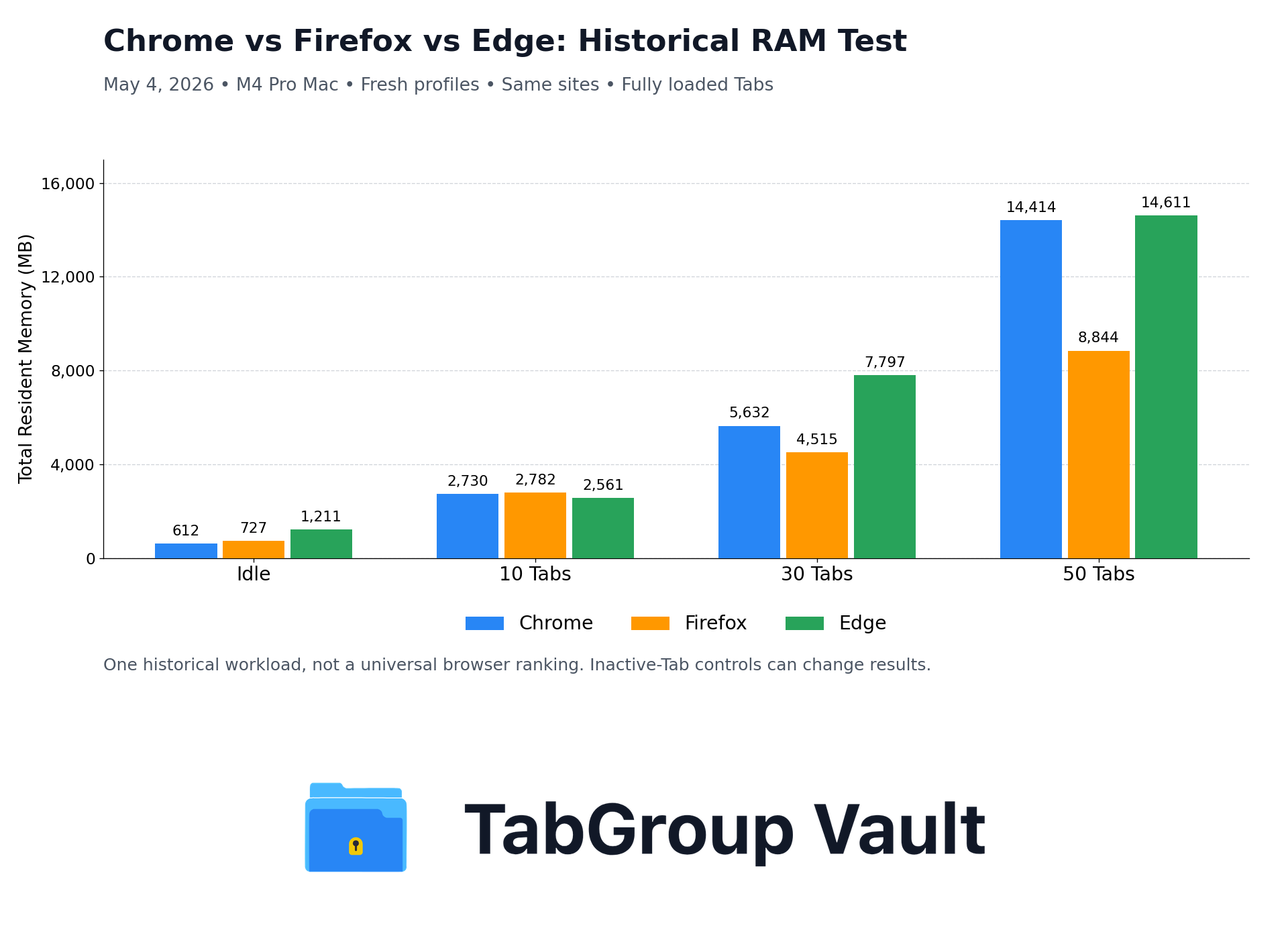
Historical May 4, 2026 test: one M4 Pro Mac workload, RAM in MB. Bar heights reproduce the article’s 12 recorded readings; this is not a new benchmark.
If you work with a lot of Tabs every day, the browser is not a neutral choice. Chrome, Firefox, and Edge handle Tab-heavy Sessions differently, and the result moves with workload, settings, extensions, video calls, pinned Tabs, audio, forms, GPU behavior, and the sites you keep open.
Web apps can distort a browser comparison fast. Treat this table as one controlled loaded-Tab test, then check your own browser with the sites, extensions, video calls, pinned Tabs, and background activity you actually use.
Native Tab Grouping
Tab grouping puts related Tabs under a named, color-coded label in the Tab bar. Small feature. Big relief once a Window turns into a workbench.
Chrome
Chrome added Tab Groups in 2020 and has refined them since. Right-click any Tab to create or join a Group. Groups can be named, colored (8 color options), collapsed with a single click, and moved between Windows. Chrome also supports saved Tab Groups that persist across Sessions. Treat saved Groups as useful organization, not a full Session backup.
Chrome's Tab Groups also have the broadest third-party extension support. TabGroup Vault can save, restore, and back up Tab Groups because Chrome exposes Tab Group data through its extension APIs.
Firefox
Firefox now has built-in desktop Tab Groups, starting with Firefox 141. Groups are local only and do not sync with Firefox Sync. Firefox 141 also added local AI grouping that identifies similar Tabs, organizes them into Groups, and suggests Group names. Mozilla describes the feature as a progressive rollout.
Firefox's container Tabs feature also allows Tabs to be isolated by identity (work, personal, banking). This is useful for privacy and account separation, but it is separate from project-style Tab grouping.
Edge
Edge is built on Chromium, so its Tab Groups feel close to Chrome's: right-click grouping, colors, and collapse behavior. Edge also has vertical Tabs built in, with Tabs in a sidebar instead of a horizontal strip.
| Feature | Chrome | Firefox | Edge |
|---|---|---|---|
| Native Tab Groups | Yes (full) | Yes (desktop, Firefox 141+) | Yes (full, same as Chrome) |
| Group colors | 8 colors | Limited / theme-dependent | 8 colors |
| Collapse Groups | Yes | Yes | Yes |
| Saved Groups | Yes (built-in) | Local only, no Firefox Sync | Yes (built-in) |
| Vertical Tabs | Varies by rollout | No (extension only) | Yes (built-in, more polished) |
| Tab search | Ctrl+Shift+A | Ctrl+Shift+Tab (list) | Ctrl+Shift+A |
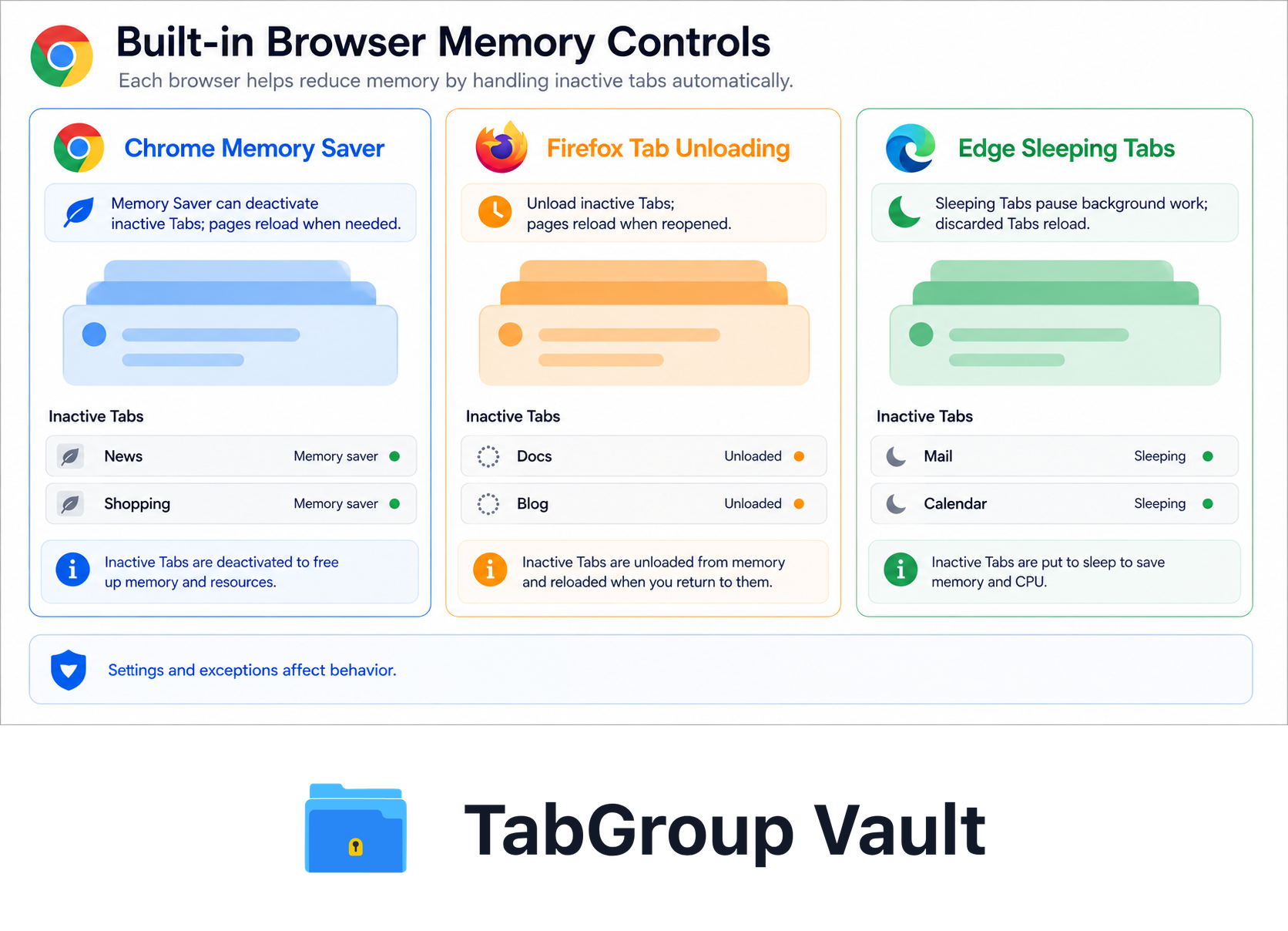
Illustrative example; layout and sample data are conceptual.
Browser RAM Usage Comparison 2026
Memory efficiency starts to matter when the Tab count stops being theoretical. On May 4, 2026, we tested each browser at idle, 10, 30, and 50 loaded Tabs, then measured total resident memory across browser processes.
| Scenario | Chrome | Firefox | Edge |
|---|---|---|---|
| Idle | 612 MB | 727 MB | 1,211 MB |
| 10 Tabs | 2,730 MB | 2,782 MB | 2,561 MB |
| 30 Tabs | 5,632 MB | 4,515 MB | 7,797 MB |
| 50 Tabs | 14,414 MB | 8,844 MB | 14,611 MB |
Firefox used less memory than Chrome and Edge at the 30-Tab and 50-Tab checkpoints. The 10-Tab result was close enough that extensions, page mix, and browser settings matter more than the browser name. If you're sticking with Chrome and want to cut its memory usage, see our guide on 10 fixes for Chrome using too much memory.
Edge used slightly less memory than Chrome at 10 Tabs in this run, but it was heavier at 30 and 50 loaded Tabs. Edge's sleeping Tabs can still help after eligible Tabs sit inactive, while Chrome's Memory Saver can produce different results once background Tabs are deactivated.
Context matters
Memory usage changes with the sites you keep open. These benchmarks use a standardized mix on one M4 Pro Mac. Your numbers will move if you run heavy web apps, media-heavy sites, extensions, Memory Saver, sleeping Tabs, pinned Tabs, downloads, forms, audio, video, notifications, or screen sharing.
Session restore and saved Tabs
Session restore is useful, but it should not outweigh the RAM result here. Chrome and Edge can reopen previous Tabs when configured to continue where you left off, and Firefox can restore previous Sessions too. The risk is simple: reopening yesterday's Window is not the same as keeping a deliberate backup of the work you meant to save.
| Restore Feature | Chrome | Firefox | Edge |
|---|---|---|---|
| Basic Tab restore | Reliable | Supported | Reliable |
| Tab Group restore | Built-in saved Groups | Newer, local only | Built-in saved Groups |
| Scroll position | Varies | Varies | Varies |
| Form data | Varies | Varies | Varies |
| Crash recovery | Automatic | User-selectable | Automatic |
Extensions and RAM
Tab and Session managers can reduce memory pressure when they help you close, save, suspend, or reopen Tabs instead of keeping every page loaded. OneTab, Workona, Toby, Session Buddy, and Tab Manager Plus are useful tools. They are the wrong yardstick for a Chrome vs Firefox vs Edge RAM benchmark.
Chrome and Edge are the cleanest fit for TabGroup Vault because they expose native Tab Group data to extensions. Firefox WebExtensions can work with Tab Groups through the tabGroups API and related tabs APIs, but Firefox's user-facing Tab Groups and extension ecosystem still work differently from Chrome's.
| Ecosystem Factor | Chrome | Firefox | Edge |
|---|---|---|---|
| Extension role in this comparison | Save or close inactive Tab Groups | Supplement native Groups | Use Chrome-compatible tools |
| Tab Group extension support | Full | Available for Group/ungroup APIs | Full (same as Chrome) |
| TabGroup Vault available | Yes | No | Yes (via Chrome store) |
| Best use here | Backup and restore Groups | Extra organization tools | Backup Groups plus sleeping Tabs |
Built-In RAM Controls
Each browser has built-in tools for keeping background Tabs under control, but they do not work the same way.
| Browser | 2026 RAM controls | Best use | Main caveat |
|---|---|---|---|
| Chrome | Memory Saver, Moderate/Balanced/Maximum levels, site exceptions, Tab memory display, performance alerts | Deactivating inactive Tabs while keeping chosen sites active | Audio, video, screen sharing, notifications, downloads, forms, pinned Tabs, and connected devices can prevent deactivation |
| Firefox | Right-click Unload Tab, about:memory, adjustable performance settings, high-memory troubleshooting | Manual control over which Tabs unload, plus troubleshooting when a site or extension gets heavy | No Chrome-style automatic Memory Saver setting, and extensions or themes can increase resource use |
| Edge | Sleeping Tabs controls, site exceptions, auto-discard policy controls, inactivity timeout controls | Reducing background-Tab CPU and memory after Tabs sit inactive | Eligibility and settings decide which Tabs sleep, so active sites may need exclusions |
Chrome: Memory Saver
Chrome's Memory Saver can deactivate inactive Tabs to free memory. It has Moderate, Balanced, and Maximum levels, lets users keep specific sites active, shows Tab memory usage, and can show performance issue alerts. Audio, video, screen sharing, notifications, downloads, forms, pinned Tabs, and connected devices can prevent deactivation. Helpful? Yes. A guarantee that every inactive Tab unloads? No.
Firefox: Tab Unloading
Firefox documents adjustable performance settings, troubleshooting for high memory or CPU use, and Tab unloading rather than a Chrome-style automatic Memory Saver setting. Firefox 140 added direct Tab unloading from the Tab right-click menu. Unloaded Tabs stay visible and reload when you revisit them. Extensions and themes can also make Firefox use more system resources, so test with your real setup.
Edge: Sleeping Tabs
Edge supports controls for enabling sleeping Tabs, blocking sleeping Tabs on specific URLs, auto-discarding sleeping Tabs, and setting an inactivity timeout. Like Chrome Memory Saver, the result comes down to eligibility and settings, so exclude active sites you need to keep awake.
TabGroup Vault: the extension layer
Works with: Chrome and Edge (Chromium-based browsers)
What it adds: Save Tab Groups as persistent snapshots, restore on demand, back up to Google Drive
Why people use it: Built-in features unload or sleep some Tabs. TabGroup Vault lets you close saved Groups entirely and restore them later.
Price: Free (10 snapshots) / $39 one-time Pro
The verdict: which browser is best for Tabs?
There is no single winner across every category. Pick based on the kind of Tab mess you create.
Choose Chrome if:
- You rely on Tab Groups as part of your daily workflow
- You want the widest selection of Tab management extensions
- You use Google Workspace and benefit from Chrome's deep integration with Google services
Choose Firefox if:
- Memory efficiency ranks above extension choice for you
- You want lower RAM in heavy loaded-Tab Sessions like this test
- Privacy features like container Tabs matter to your workflow
- You are comfortable with Firefox's newer Tab Groups and do not need Chrome's saved-Group ecosystem
Choose Edge if:
- You want Chrome's Tab Groups plus built-in vertical Tabs
- You prefer sleeping Tabs enabled by default with minimal configuration
- You want access to Chrome extensions while using Edge's sleeping-Tab and vertical-Tab defaults
- You work in a Microsoft-centric environment
Our take: browser choice is only part of it
The clearest result is that Firefox used much less RAM than Chrome and Edge with 30 and 50 loaded Tabs in this test. That counts if you keep large Sessions fully loaded. Still, all three browsers behave better when you reduce the active Tab count, and Chrome or Edge may improve once Memory Saver or sleeping Tabs has time to deactivate background pages.
The bigger gains come from habits: Group Tabs, save inactive Groups, close what you do not need right now, and restore on demand. On Chrome and Edge, TabGroup Vault supports that workflow with native Tab Group snapshots. On Firefox, native Groups and unloading help, though saved Groups are local only and do not sync through Firefox Sync.
For more on tuning Chrome, see our guides to fixing Chrome using too much memory and reducing Chrome memory without losing your Tabs. For the technical reasons browsers get heavy, read why browsers slow down with too many Tabs.