Platform vs. Tool: Different Ambitions
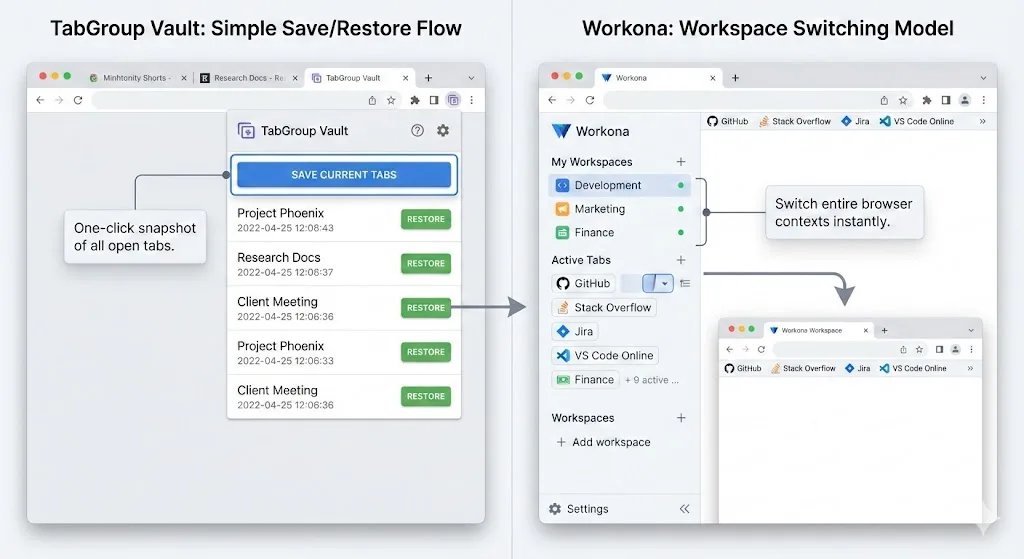
Workona and TabGroup Vault both help you organize your browser, but they have different ambitions. Workona is a workspace management platform that wants to become the control center for your digital work. TabGroup Vault is a focused tool that does one thing well: save and restore Chrome tab groups.
This difference in scope affects everything -- the feature set, the pricing, the learning curve, and where your data lives. Understanding this distinction is key to choosing between them.
Feature-by-Feature Comparison
| Feature | TabGroup Vault | Workona |
|---|---|---|
| Core Concept | Tab group snapshots | Workspaces with tabs, docs, tasks |
| Tab Group Support | Native Chrome groups (names, colors) | Own workspace model |
| Save/Restore | One-click snapshot and restore | Auto-switch between workspaces |
| Cloud Sync | Google Drive (you control the data) | Proprietary cloud (Workona servers) |
| Task Management | No | Yes (built-in) |
| Doc/Resource Linking | No | Yes |
| Team Sharing | No | Yes (Pro plan) |
| Multi-Profile | Up to 5 Chrome profiles | No |
| Snapshot History | Yes | No |
| Privacy | Local-first, optional Drive | Cloud-dependent |
| Free Tier | 5 snapshots | 5 workspaces, limited features |
| Paid Tier | $29 one-time (lifetime) | $4/month ($48/year) |
| Learning Curve | Minimal | Moderate |
The Cost Story
Pricing is where these two tools diverge most sharply, and it deserves careful attention.
Workona's Pro plan costs $4 per month, billed monthly, or less if you pay annually. Over time, those monthly payments add up:
- After 6 months: Workona = $24, TabGroup Vault = $29. Workona is still cheaper.
- After 8 months: Workona = $32, TabGroup Vault = $29. TabGroup Vault becomes cheaper.
- After 1 year: Workona = $48, TabGroup Vault = $29. You have saved $19.
- After 2 years: Workona = $96, TabGroup Vault = $29. You have saved $67.
- After 3 years: Workona = $144, TabGroup Vault = $29. You have saved $115.
TabGroup Vault's one-time pricing model means the longer you use it, the better the value. With Workona, you pay for as long as you use it, and canceling means losing access to Pro features.
Subscription Lock-In
With any subscription tool, canceling means reverting to the free tier. If you have built your workflow around Workona's Pro features, downgrading can be disruptive. TabGroup Vault's one-time purchase means you own the full feature set permanently with no risk of losing access.
Where Workona Wins
Workona is a more ambitious product with features TabGroup Vault does not attempt to offer:
Workspace Switching
Workona's workspace model lets you switch between work contexts with one click. Each workspace can contain tabs, documents, links, and tasks. Switching workspaces suspends your current tabs and opens the ones associated with the new workspace. This helps people who switch between multiple projects throughout the day.
Integrated Task Management
Workona includes to-do lists within each workspace. You can associate tasks with specific tabs or resources, creating a project hub inside your browser. TabGroup Vault does not have task management features.
Team Features
Workona allows teams to share workspaces, making it useful for collaborative environments where multiple people need access to the same set of resources. TabGroup Vault is a personal tool with no team sharing capabilities.
Doc and Resource Hub
Beyond tabs, Workona lets you pin documents, links, and notes to each workspace. It becomes a project dashboard rather than just a tab manager. This integration is valuable for users who want everything in one place.
When Workona Is the Right Choice
If you need workspace switching, team sharing, integrated tasks, and a project-hub approach to browser management -- and you are comfortable with a monthly subscription and cloud-dependent data -- Workona delivers real value.
Where TabGroup Vault Wins
Native Tab Group Integration
TabGroup Vault works with Chrome's built-in tab groups rather than replacing them with a proprietary system. If you have organized your tabs into named, color-coded Chrome groups, TabGroup Vault preserves that. Workona uses its own workspace concept, which means your Chrome tab groups are not the primary organizational unit.
Privacy and Data Control
TabGroup Vault stores your data locally by default. If you enable cloud backup, it goes to your own Google Drive account -- not to a third-party server. You own your data and can access it directly in Drive.
Workona stores your data on its own servers. You are trusting a third party with your browsing data, workspace contents, and usage patterns. For privacy-conscious users, this is a meaningful difference.
Simplicity
TabGroup Vault's workflow is two actions: save (take a snapshot) and restore (rebuild your groups). There is almost no learning curve. Workona requires understanding workspaces, sections, resources, and how switching contexts affects your open tabs. It is a more powerful tool, but that power comes with more concepts to learn.
One-Time Pricing
After the initial $29 purchase, TabGroup Vault never charges you again. No renewal emails, no price increases, no re-evaluation of whether the subscription is still worth it. Workona requires ongoing payment for ongoing access to Pro features.
Privacy Comparison
This matters more than many users realize. Tab data reveals a lot about your life: what you research, what you buy, what you read, where you bank, and what you work on.
TabGroup Vault: Data stays on your device by default. Cloud backup goes to your personal Google Drive, encrypted in transit. No data is sent to TabGroup Vault's servers. No analytics on your browsing habits.
Workona: Data is stored on Workona's cloud infrastructure. This is necessary for features like cross-device sync and team sharing, but it means your workspace contents -- including all your tab URLs -- are on third-party servers.
Neither approach is wrong, but they reflect different trade-offs between convenience and privacy.
TabGroup Vault Quick Facts
Price: Free (5 snapshots) / $29 one-time lifetime Pro
Data: Local-first, optional Google Drive backup
Focus: Save and restore Chrome tab groups
Profiles: Up to 5 Chrome profiles supported
Who Should Choose What
Choose Workona if:
- You need a full workspace management platform, not just tab saving
- You work in teams and need shared workspaces
- You want integrated tasks and document linking
- You are comfortable with cloud-dependent data and subscription pricing
Choose TabGroup Vault if:
- You use Chrome's native tab groups and want to preserve them
- You prefer one-time pricing over subscriptions
- You value privacy and want local-first or Drive-based storage
- You want a simple, focused tool rather than a feature-heavy platform
- You use multiple Chrome profiles
The Bottom Line
Workona and TabGroup Vault serve overlapping but distinct audiences. Workona is for users who want a comprehensive workspace platform and are willing to pay a monthly fee for it. TabGroup Vault is for users who have embraced Chrome's native tab groups and want a reliable, private, affordable way to back them up and restore them.
If you are unsure, the simplest test is this: Do you use Chrome tab groups or Workona-style workspaces? If you already use and love Chrome's built-in groups, TabGroup Vault enhances that workflow for a one-time cost. If you prefer a more structured workspace platform, Workona has more to offer -- at a higher ongoing price.