Why you need a Chrome tab organizer
Chrome is the world's most popular browser, but it still lacks strong built-in tools for organizing large numbers of tabs. Chrome added tab groups in 2020 and saved tab groups in 2023, which helped. But those groups still vanish after crashes, updates, or accidental closures. That is where tab organizer extensions step in.
If you regularly work with more than 20 tabs, an organizer extension is not a luxury. It is a necessity. The right tool can cut the time you spend finding tabs in half and eliminate the anxiety of losing your research or project context.
We installed, configured, and tested 10 of the most popular Chrome tab organizer extensions over two weeks. We evaluated each on features, ease of use, pricing, and how well it works with Chrome's native tab groups. Here are the results.
The 10 best Chrome tab organizer extensions
1. TabGroup Vault
Best for saving and restoring Chrome tab groups.
We built TabGroup Vault specifically for Chrome's native tab groups. It takes a snapshot of your tab groups with one click and restores them exactly as they were, including group names, colors, and tab order. Unlike session managers that flatten everything into a list, TabGroup Vault preserves the structure you already created in Chrome.
The free tier gives you 5 snapshots, and the Pro version is a one-time $29 payment for unlimited snapshots, auto-save, and export. No monthly subscription.
TabGroup Vault
Price: Free (5 snapshots) / $29 one-time Pro
Best for: Users who rely on Chrome tab groups
Standout: Only extension that fully preserves tab group structure, colors, and names
2. OneTab
Best for quickly collapsing all tabs into a list to save memory.
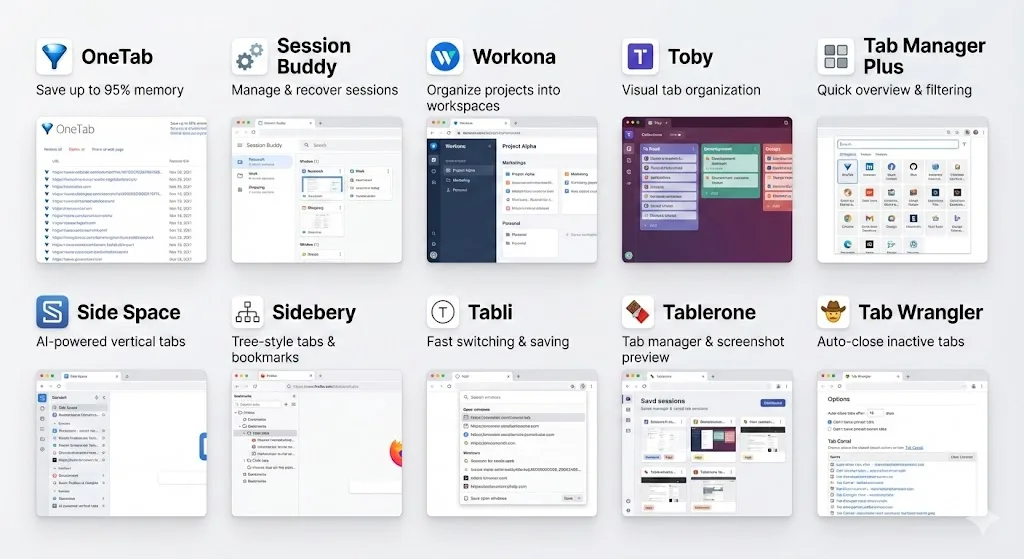
OneTab has been around for years and is still one of the most installed tab extensions. Its core function is simple: click the icon and all your tabs collapse into a single page with a list of links. It saves memory well, but it does not preserve tab groups, does not support auto-save, and the interface has not been updated in a long time.
3. Session Buddy
Best for saving entire browser sessions for later.
Session Buddy saves all open windows and tabs as a session snapshot. It is thorough and reliable, with options to name sessions and restore them later. However, it treats tabs as flat lists within windows. Tab group structure, colors, and names are lost during save and restore.
4. Workona
Best for teams and users who want a full workspace environment.
Workona replaces Chrome's tab model with its own workspace concept. You create workspaces, add tabs to them, and switch between them. It is capable but opinionated. If you prefer Chrome's native tab groups, Workona's approach can feel like a parallel system that duplicates effort. Pricing starts at $0 for basic use and $8/month for Pro.
5. Toby
Best for visual organization on the new tab page.
Toby replaces your new tab page with a visual dashboard where you can drag and drop tabs into collections. It looks good and works well for people who like visual organization. The downside is that it takes over your new tab page, which conflicts with other new tab extensions. Tab groups are not supported.
6. Tab Manager Plus
Best for searching and navigating through many open tabs.
Tab Manager Plus gives you a popup window that shows all open tabs across all windows with a search bar. It is useful for finding a specific tab when you have dozens open, but it does not save tabs or sessions. It is a navigation tool, not a saving tool.
7. Cluster
Best for managing tabs across multiple windows.
Cluster shows all your open windows and their tabs in a single view, letting you move tabs between windows with drag and drop. It adds a window-management layer that Chrome lacks. However, it does not save or restore sessions, and tab group support is minimal.
8. Tab Wrangler
Best for automatically closing inactive tabs.
Tab Wrangler watches your tabs and automatically closes ones you have not visited in a configurable amount of time. Closed tabs are saved to a list so you can reopen them. It is a cleanup tool rather than an organizer, best suited for people who accumulate tabs passively and need automatic pruning.
9. The Great Suspender (successor)
Best for reducing memory usage of inactive tabs.
The original Great Suspender was removed from the Chrome Web Store, but community forks carry on the concept. These extensions suspend inactive tabs to free memory without closing them. They do not organize tabs, but they solve the performance problem that often accompanies tab overload.
10. Sidekick (workspaces)
Best for users who want a full browser replacement with workspace features.
Sidekick is technically a Chromium-based browser rather than an extension. It includes built-in workspaces, tab suspension, and app integration. If you are willing to switch browsers, it bundles many features. However, switching browsers means losing Chrome-specific extensions and sync features.
Feature comparison table
Here is how all 10 extensions stack up across the features that matter most for tab organization.
| Extension | Tab Group Support | Session Save | Auto-Save | Pricing |
|---|---|---|---|---|
| TabGroup Vault | Full (colors, names) | Yes | Yes (Pro) | Free / $29 one-time |
| OneTab | No | Yes (flat list) | No | Free |
| Session Buddy | No | Yes | Yes | Free / Donate |
| Workona | Partial | Yes | Yes | Free / $8/mo |
| Toby | No | Yes | No | Free / $4.99/mo |
| Tab Manager Plus | No | No | No | Free |
| Cluster | Minimal | No | No | Free |
| Tab Wrangler | No | No | Auto-close | Free |
| Great Suspender | No | No | Auto-suspend | Free |
| Sidekick | Own system | Yes | Yes | Free / $12/mo |
How to choose the right tab organizer
The best extension depends on what problem you are trying to solve. Here is a quick decision framework.
If you use Chrome tab groups
TabGroup Vault is the clear choice. It is the only extension that saves and restores the full tab group structure including names, colors, and tab positions. Every other extension either ignores tab groups or flattens them into plain lists.
If you just want to reduce memory usage
OneTab or a tab suspender extension will do the job. OneTab collapses everything into a list, while suspenders keep tabs in place but unload them from memory. Neither organizes tabs, but they solve the performance issue.
If you need full workspace management
Workona or Sidekick have the most workspace features. Be prepared for a learning curve and, in Workona's case, a monthly subscription. These tools work best when you commit to their workflow rather than using Chrome's native features alongside them.
If you want to search through open tabs
Tab Manager Plus is lightweight and effective for this specific use case. It adds a searchable tab list without changing how you organize tabs.
Pro tip
You can combine extensions for different purposes. For example, use TabGroup Vault to save your tab groups and Tab Manager Plus to search through open tabs. Extensions that serve different functions rarely conflict with each other.
What about Chrome's built-in tools?
Chrome has improved its native tab management over the years. Tab groups, saved tab groups, tab search (Ctrl+Shift+A), and the recently-closed tabs menu all help. Extensions fill the remaining gaps.
Chrome's saved tab groups, for instance, only work if you manually save each group and if Chrome does not lose them during an update or crash. There is no automatic backup, no export, and no way to restore groups after they disappear from the saved list. That is the exact gap TabGroup Vault fills.
For a deeper dive into organizing with native tools, see our guide on how to organize Chrome tabs.
Pricing comparison: one-time vs subscription
Cost is a real factor when choosing a tab organizer. Here is what the paid options look like over time.
| Extension | Year 1 | Year 2 | Year 3 |
|---|---|---|---|
| TabGroup Vault Pro | $29 | $29 | $29 |
| Workona Pro | $96 | $192 | $288 |
| Toby Pro | $60 | $120 | $180 |
| Sidekick Pro | $144 | $288 | $432 |
A one-time payment avoids the compounding cost of subscriptions. Over three years, TabGroup Vault Pro costs less than three months of Sidekick.
Our recommendation
If Chrome tab groups are part of your workflow, TabGroup Vault is the best choice. It is the only extension that treats tab groups as first-class citizens, preserving everything about them when you save and restore. The one-time pricing means you pay once and get updates for life.
If you do not use tab groups and just want to clear clutter, OneTab is still a solid free option. For teams that need shared workspaces and are comfortable with a subscription, Workona has the most features in that category.
For more in-depth reviews, check out our hands-on review of 7 tab managers and our guide to building a tab management system.