Two Very Different Approaches to Tab Organization
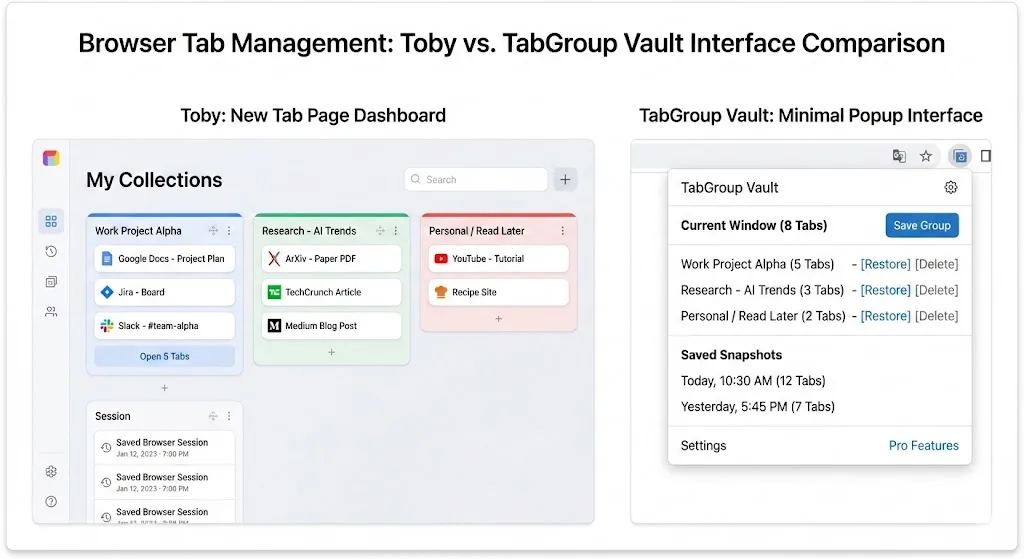
Toby and TabGroup Vault both help you organize your Chrome tabs, but they go about it in fundamentally different ways. Understanding this difference is more important than comparing feature lists.
Toby is a visual dashboard. It takes over your new tab page and replaces it with a Kanban-style board of saved tab collections. Every time you open a new tab, you see your organized collections, and you can drag and drop tabs into them. Toby is always visible, always present, and becomes the central hub of your browsing experience.
TabGroup Vault is an invisible backup tool. It works silently alongside Chrome without changing any part of your browser interface. When you want to save your tab groups, you click the extension icon, take a snapshot, and go back to work. When you need to restore, you pick a snapshot and your groups come back. Between those moments, you would not even know the extension is installed.
Neither approach is objectively better. They serve different personality types and different workflows.
Feature-by-Feature Comparison
| Feature | TabGroup Vault | Toby |
|---|---|---|
| Interface | Popup / extension icon | Replaces new tab page |
| Organization Model | Chrome tab group snapshots | Visual collections / columns |
| Tab Group Support | Full (names, colors, structure) | None (own system) |
| Save Method | One-click snapshot | Drag and drop to collections |
| Restore Method | One-click full restore | Click to open collection |
| Cloud Sync | Google Drive (your account) | Proprietary cloud |
| New Tab Page | Unchanged | Replaced with Toby dashboard |
| Snapshot History | Yes | No |
| Multi-Profile | Up to 5 Chrome profiles | No |
| Team Sharing | No | Yes (Pro) |
| Free Tier | 5 snapshots | Unlimited collections (limited features) |
| Paid Tier | $29 one-time | $4.50/month |
| Privacy | Local-first, optional Drive | Cloud-dependent |
Where Toby Wins
Visual Organization
Toby's biggest strength is its visual, always-present dashboard. If you are a visual thinker who benefits from seeing your saved tabs laid out in columns, Toby delivers that experience every time you open a new tab. It is like having a Trello board for your browser tabs.
You can organize collections by project, client, topic, or any other category. The drag-and-drop interface feels natural and the visual layout makes it easy to find what you need at a glance.
Always Visible
Because Toby replaces your new tab page, your saved collections are always one new tab away. You do not need to remember to open an extension or click an icon. Your organized tabs are right there, front and center, every time you start a new browsing action.
Team Collections
Toby's Pro plan includes team sharing, allowing you to create shared collections that multiple team members can access. This is useful for onboarding new employees who need the same set of reference links, or for teams that share common resources.
When Toby Is the Right Choice
If you want a visual, always-visible dashboard for your saved tabs and do not mind giving up your new tab page, Toby's approach is genuinely appealing. It works well for visual thinkers who benefit from seeing their organization at all times.
Where TabGroup Vault Wins
Non-Invasive Design
TabGroup Vault does not replace any part of your browser. Your new tab page stays the same. Your Chrome experience is unchanged. The extension works in the background, ready when you need it, invisible when you do not. For users who are particular about their browser setup and do not want extensions taking over Chrome interfaces, this is a significant advantage.
Native Tab Group Support
TabGroup Vault works directly with Chrome's built-in tab groups. If you have already invested time in organizing tabs into named, color-coded groups, TabGroup Vault preserves all of that when you save. Toby uses its own collection system, which means your Chrome tab group names and colors are not part of Toby's organizational model.
Snapshot History
TabGroup Vault maintains a timeline of your saved snapshots. You can go back to a workspace from last week, last month, or any saved point. Toby's collections are live and current -- there is no built-in way to revisit a previous state of your collections.
Cost Over Time
The pricing difference is worth calculating:
- 7 months of Toby Pro: $31.50. TabGroup Vault is now cheaper at $29.
- 1 year of Toby Pro: $54. You have saved $25 with TabGroup Vault.
- 2 years of Toby Pro: $108. You have saved $79 with TabGroup Vault.
If you plan to use a tab organizer for more than a few months, the one-time pricing makes a real financial difference.
Privacy
TabGroup Vault stores data locally by default. Cloud backup goes to your personal Google Drive. Toby syncs to its own cloud servers, meaning your browsing data -- every URL you save, every collection name -- lives on third-party infrastructure.
The New Tab Page Question
Whether replacing your new tab page is a positive or negative depends entirely on your perspective. Some users love Toby's dashboard and consider it the best part of the extension. Others find it disruptive and miss Chrome's default new tab page with its search bar and frequently visited sites.
There is no middle ground with Toby -- it takes over the new tab page completely. If you later decide you do not want that, uninstalling Toby means losing access to your saved collections (unless you have exported them).
TabGroup Vault avoids this dilemma entirely by not touching any Chrome interfaces. It is purely additive -- it adds backup/restore capability without taking anything away.
TabGroup Vault Quick Facts
Price: Free (5 snapshots) / $29 one-time lifetime Pro
Interface: Minimal popup, does not replace any Chrome pages
Data: Local-first, optional Google Drive backup
Focus: Chrome tab group backup and restore
Who Should Choose What
Choose Toby if:
- You want a visual, always-visible tab dashboard
- You are comfortable replacing your new tab page
- You think in terms of visual collections rather than tab groups
- You need team sharing features
- You prefer drag-and-drop organization
Choose TabGroup Vault if:
- You want to keep your Chrome interface unchanged
- You use Chrome's native tab groups and want to preserve them
- You prefer one-time pricing over monthly subscriptions
- You want snapshot history to revisit past workspace states
- You value local-first data storage and privacy
Can You Use Both?
Technically, yes. Toby replaces your new tab page while TabGroup Vault operates via the extension popup. They do not directly conflict. However, using both means maintaining two separate organizational systems -- Toby's collections and Chrome's tab groups via TabGroup Vault. For most people, picking one approach and committing to it produces a cleaner workflow.
The Verdict
Toby and TabGroup Vault cater to different organizational preferences. Toby is for visual organizers who want their saved tabs front and center at all times. TabGroup Vault is for users who want reliable, invisible backup and restore of the tab group structure they have already built in Chrome.
If you love the idea of a visual tab dashboard, try Toby's free tier. If you just want your tab groups to survive crashes, updates, and accidental closures, try TabGroup Vault's free tier. Within a day or two, you will know which approach feels right for how you work.