Why people are looking for OneTab alternatives
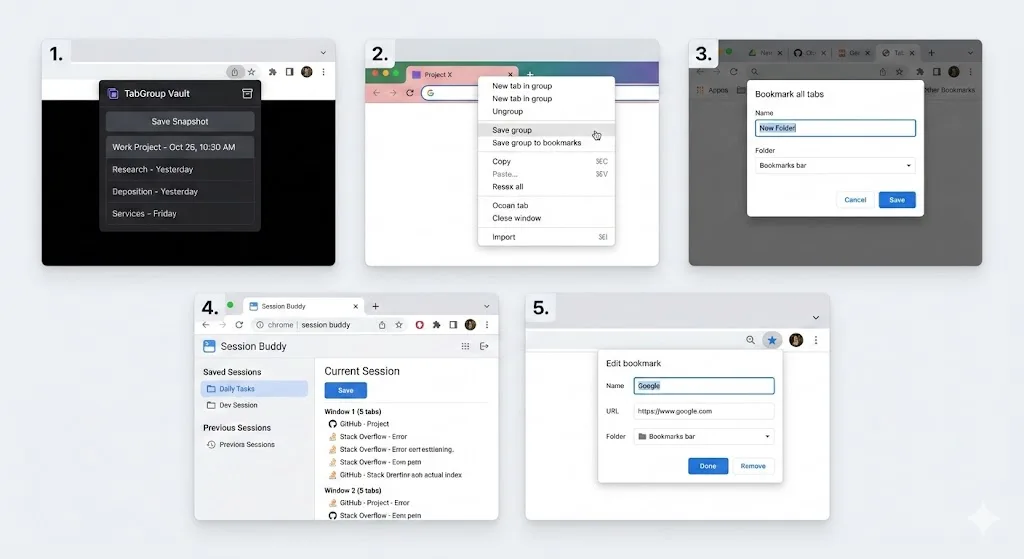
OneTab was one of the first Chrome extensions to tackle tab overload. Its premise was simple: click a button, and all your open tabs collapse into a single list of links. It reduced Chrome's memory footprint and gave you a clean slate.
For a long time, that was enough. But Chrome has changed since OneTab's early days. The introduction of native tab groups in 2020 shifted how people organize their browser. OneTab still treats every tab as a flat list item, ignoring the color-coded groups you spent time setting up. While OneTab received a major update in December 2025, it still does not support Chrome's native tab groups.
Here are the main reasons users are looking for something better:
- OneTab flattens your carefully organized groups into a plain list. No tab group awareness at all.
- Your saved tabs live only in local browser storage. A Chrome reinstall or profile reset wipes everything. No cloud backup.
- You cannot go back to a previous version of your saved tabs. No snapshot history.
- The UI has not been meaningfully updated to match modern Chrome design, though a major update arrived in late 2025.
- Some users have reported losing their entire OneTab list after Chrome updates.
The 5 best OneTab alternatives for 2026
We tested dozens of tab management extensions and narrowed the list to five that genuinely improve on what OneTab offers. Each takes a different approach, so we will break down the strengths and trade-offs of each.
| Feature | TabGroup Vault | Session Buddy | Workona | Toby | Tab Manager Plus |
|---|---|---|---|---|---|
| Tab Group Support | Full (colors, names, structure) | Partial | Own workspace model | No | Partial |
| One-Click Save | Yes | Yes | Auto-save | Drag-and-drop | No |
| One-Click Restore | Yes (full group structure) | Yes (windows) | Yes (workspaces) | Yes (collections) | No |
| Cloud Backup | Google Drive | No | Yes (proprietary) | Yes (proprietary) | No |
| Snapshot History | Yes | Yes (session log) | No | No | No |
| Pricing | Free (5 snapshots) / $29 lifetime | Free | Free / $4/month | Free / $4.50/month | Free |
| Multi-Profile Support | Up to 5 profiles | No | No | No | No |
| Privacy Focus | Local-first, optional Drive | Local only | Cloud-based | Cloud-based | Local only |
1. TabGroup Vault, best for tab group users
TabGroup Vault at a glance
Price: Free (5 snapshots) / $29 one-time lifetime Pro
Best for: Users who rely on Chrome tab groups and want reliable backup and restore
Key feature: Saves and restores tab group structures including names, colors, and tab order
TabGroup Vault was built from the ground up for Chrome's tab groups. Where OneTab sees a list of URLs, TabGroup Vault sees your organized workspace: the group names, the color coding, and the tab arrangement you set up.
Saving is one click. It creates a snapshot of all your current tab groups. Restoring is also one click. It rebuilds those groups exactly as they were, with the correct names, colors, and tabs inside each group. OneTab simply cannot do this.
The free tier gives you five snapshots, which is enough to try the workflow. The Pro version at $29 is a one-time payment for unlimited snapshots, Google Drive backup, and support for up to five Chrome profiles. There is no subscription and no recurring charge.
2. Session Buddy, best free session saver
Session Buddy takes a session-focused approach. It automatically logs your browser sessions over time, creating a history of what windows and tabs you had open at different points. You can name and save sessions manually, then restore them later.
The main advantage of Session Buddy is that it is completely free and has been reliable for years. The main limitation is that it thinks in terms of windows, not tab groups. If you restore a session, your tabs come back in the right windows, but any tab group structure is lost or only partially preserved.
Session Buddy is a strong choice if you do not use tab groups and just want a dependable way to save and restore your open tabs.
3. Workona, best for heavy workspace users
Workona takes a different approach by replacing your tab workflow with its own workspace concept. Each workspace is a collection of tabs, docs, and links that you can switch between. It syncs to the cloud and works across devices.
The strength of Workona is its deep feature set: you get workspaces, shared resources, task integration, and more. The trade-off is cost and complexity. Workona's free plan is limited, and the Pro plan runs $4 per month. Over two years, that is $96 compared to TabGroup Vault's one-time $29.
Workona makes sense if you want a full workspace management platform. It is overkill if you just want to save and restore tab groups.
4. Toby, best for visual organizers
Toby replaces your Chrome new tab page with a visual dashboard of saved tab collections. You drag and drop tabs into labeled columns, creating a visual layout of your saved links organized by project or topic.
Toby's visual approach appeals to people who think spatially. The downside is that it takes over your new tab page, which some users find intrusive. It also does not work with Chrome's native tab groups; you are using Toby's own organizational system instead.
If you prefer a visual drag-and-drop interface and do not mind a custom new tab page, Toby is worth trying. Its free tier is generous, though the Pro plan at $4.50/month adds up over time.
5. Tab Manager Plus, best for real-time tab control
Tab Manager Plus takes a different direction entirely. Rather than saving tabs for later, it gives you a real-time popup view of every open tab across all windows. You can search, filter, rearrange, and close tabs from a single panel.
It is an excellent tool for people who keep dozens of tabs open and need a way to navigate them efficiently in the moment. However, it does not save or restore sessions. Once you close a tab, it is gone. Think of Tab Manager Plus as a better tab bar, not a tab backup tool.
Tab Manager Plus is completely free and open source, which is a real point in its favor.
How to choose the right OneTab alternative
The right tool depends on what you are actually trying to solve:
- If you use Chrome tab groups and want to save them, TabGroup Vault is the only extension built specifically for this. It preserves your group names, colors, and structure.
- If you want free session saving without tab groups, Session Buddy is the most reliable free option for saving and restoring window-based sessions.
- If you want a full workspace management platform, Workona has the most features, but at a higher ongoing cost.
- If you prefer visual, drag-and-drop organization, Toby's new-tab-page approach gives you a visual dashboard for your saved tabs.
- If you need to manage many open tabs in real time, Tab Manager Plus gives you the best live tab overview and search.
The cost of doing nothing
Many people stick with OneTab or no tool at all because switching feels like effort. But the real cost is the time you lose when Chrome crashes, updates, or you accidentally close a window and lose an hour of carefully organized research.
If you have ever spent 20 minutes trying to reconstruct a set of tabs from your browser history, you know the pain. A good tab manager pays for itself after preventing just one of those incidents.
Migration tip
Switching from OneTab does not have to be abrupt. Install your new tool alongside OneTab, test it for a week, and migrate once you are confident. Most of these extensions can run side by side without conflict.
What about OneTab's strengths?
To be fair, OneTab still has some things going for it. It is completely free with no limitations. It received a major update in December 2025 (version 2.4), showing the developers are still maintaining it. And it has millions of users, which means it has been battle-tested over many years.
If all you need is to collapse tabs into a list and reopen them later, and you do not use tab groups, OneTab still works fine for that narrow use case. The alternatives become compelling when you need more: group awareness, cloud backup, snapshot history, or a more modern interface.
Final verdict
OneTab was a pioneer, but the tab management space has moved past it. Chrome's native tab groups changed how people organize their browser, and the best modern extensions have adapted to that reality.
For most users who rely on tab groups, TabGroup Vault is the most targeted solution at a fair one-time price. For those who want a free session saver, Session Buddy remains excellent. And for power users who want a full workspace platform, Workona delivers, at a recurring cost.
Pick the one that matches the problem you actually have, install the free version, and give it a real week of use. You will know pretty quickly if it fits.