The Confusion Between Suspenders and Managers
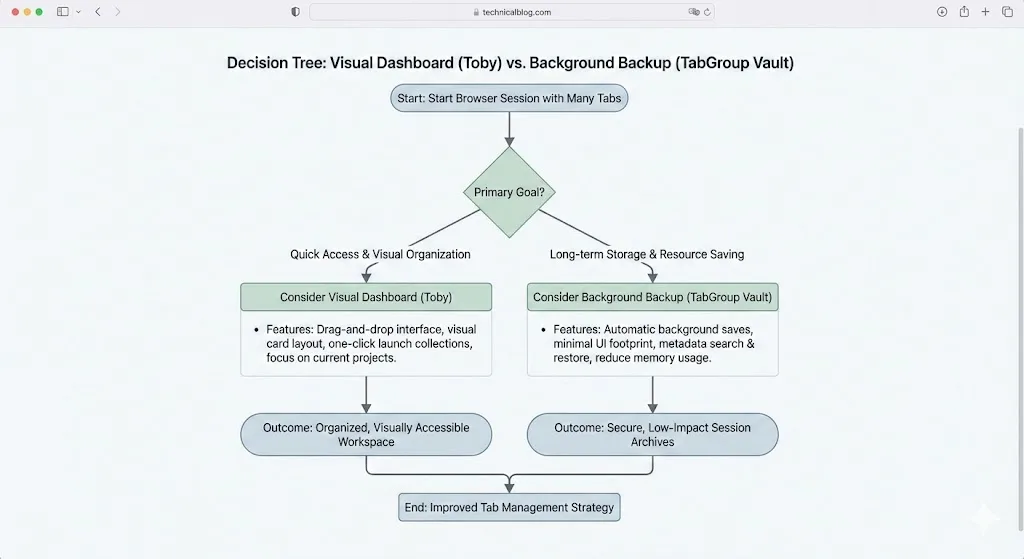
When people search for help with too many Chrome tabs, they often end up comparing tools that solve completely different problems. Tab suspenders and tab managers sound similar, but they address different symptoms of tab overload.
Tab suspenders deal with the performance problem. When you have 50+ tabs open, Chrome can consume gigabytes of RAM because each tab runs as its own process. A tab suspender automatically unloads tabs you have not used recently, freeing up memory. The tab stays in your tab bar -- it just is not actively loaded until you click on it.
Tab managers deal with the organization problem. They help you save tabs for later, find specific tabs among dozens of open ones, group tabs by project, or restore a set of tabs you had open yesterday. They are not about memory -- they are about keeping your work organized.
One is a performance tool. The other is a productivity tool. You might need one, the other, or both.
Popular Tab Suspenders
The tab suspender category has been through some turbulence. The Great Suspender, once the most popular option, was removed from the Chrome Web Store in 2021 due to security concerns after a change in ownership. Since then, the landscape has shifted:
Chrome's Built-In Memory Saver (Recommended)
Chrome now includes a native Memory Saver feature (also called tab discarding) that automatically suspends inactive tabs to free up resources. It works well for most users and requires no extension. You can enable it in Chrome Settings under Performance. This has reduced the need for third-party suspender extensions for many users.
The Great Suspender (No Track)
A community-maintained fork of the original Great Suspender, stripped of the tracking code that caused the original's removal. It provides more control than Chrome's built-in feature, including whitelists, custom suspend timers, and visual indicators.
Auto Tab Discard
A lightweight extension that works with Chrome's native tab discarding API. It offers more granular control over which tabs get suspended and when, compared to Chrome's built-in setting.
Popular Tab Managers
Tab managers come in several varieties, each emphasizing different aspects of tab organization:
| Tool | Type | Best For | Price |
|---|---|---|---|
| TabGroup Vault | Tab group backup/restore | Saving and restoring tab groups | Free / $29 lifetime |
| Tab Manager Plus | Real-time tab navigator | Searching and managing open tabs | Free (open source) |
| Session Buddy | Session saver | Logging and restoring browser sessions | Free |
| OneTab | Tab collector | Collapsing tabs into a list | Free |
| Workona | Workspace platform | Project-based workspace management | Free / $4/month |
How to Diagnose Your Problem
The easiest way to figure out what you need is to identify your main symptom:
Symptom: Chrome Is Slow or Your Computer Lags
If your computer slows down when you have many tabs open, your problem is resource consumption. Each tab uses memory, and Chrome's combined usage can overwhelm your system.
Solution: Enable Chrome's built-in Memory Saver feature. Go to Settings, then Performance, and turn on Memory Saver. This is the simplest fix and requires no extension. If you need more control, consider a suspender extension like Auto Tab Discard.
Symptom: You Lose Tabs After Crashes or Restarts
If your problem is that Chrome updates, crashes, or restarts wipe out your carefully organized tab groups, you have an organization and persistence problem.
Solution: A tab manager that saves your work. TabGroup Vault is designed specifically for this -- it creates snapshots of your tab groups that survive any Chrome disruption and can be restored with one click.
Symptom: You Cannot Find Tabs Among Dozens of Open Ones
If your tab bar is so crowded that you cannot find anything, you have a navigation problem.
Solution: A real-time tab manager like Tab Manager Plus that gives you a searchable overview of all open tabs.
Symptom: All of the Above
If you are dealing with slowness, tab loss, and navigation chaos, you might benefit from a combination: Chrome's Memory Saver for performance, plus a tab manager for organization.
Why Chrome's Built-In Features Changed the Game
Chrome's Memory Saver feature, introduced in version 108, fundamentally changed the tab suspender market. Before it existed, you needed a third-party extension to prevent Chrome from consuming all your RAM. Now, Chrome handles this natively.
Memory Saver automatically discards tabs you have not used recently, freeing up resources. When you click a discarded tab, it reloads. For most users, this built-in feature is sufficient, and the need for a dedicated suspender extension has decreased.
However, Chrome's tab management features have not evolved as much. While Chrome now has native tab groups (a significant addition), it still lacks reliable save and restore for those groups. Tab groups can still vanish after crashes, updates, or if you accidentally close a window. This is the gap that tab managers like TabGroup Vault fill.
The Modern Stack for Tab Power Users
The most efficient setup in 2026: Chrome's built-in Memory Saver (for performance) + TabGroup Vault (for tab group backup and restore). You get memory management handled natively by Chrome, and workspace preservation handled by a dedicated extension. No need for a separate tab suspender.
Where TabGroup Vault Fits In
TabGroup Vault is not a tab suspender and does not reduce Chrome's memory usage. It is a tab group backup and restore tool. Its role in your browser setup is specifically to solve the problem of tab group loss.
If you use Chrome tab groups to organize your work -- naming them, color-coding them, and arranging tabs within them -- TabGroup Vault ensures that work is never lost. One click creates a snapshot. One click restores it. Your groups come back with their names, colors, and tabs exactly as they were.
This is complementary to tab suspension, not a replacement for it. You can (and should) use Chrome's Memory Saver alongside TabGroup Vault for the best of both worlds: efficient memory usage and reliable workspace preservation.
TabGroup Vault Quick Facts
Type: Tab group backup and restore (not a suspender)
Price: Free (5 snapshots) / $29 one-time lifetime Pro
Backup: Google Drive integration
Works with: Chrome's Memory Saver, Tab Manager Plus, and other extensions
Comparison: Suspender vs Manager Features
| Capability | Tab Suspenders | Tab Managers (like TGV) |
|---|---|---|
| Reduce memory usage | Yes | No |
| Save tabs for later | No | Yes |
| Restore closed tabs | No | Yes |
| Preserve tab groups | No | Yes |
| Cloud backup | No | Some (TGV uses Google Drive) |
| Improve Chrome speed | Yes | No |
| Organize tabs | No | Yes |
| Work across sessions | No | Yes |
The Bottom Line
Tab suspenders and tab managers are not competing products -- they are different tool categories for different problems. The question is not which one is better, but which problem you actually have.
For performance issues, start with Chrome's built-in Memory Saver. It handles most users' needs without installing anything. For tab organization and preservation, a dedicated tab manager makes the difference between losing your carefully arranged workspace and keeping it safe.
If you rely on Chrome tab groups and want them to survive no matter what Chrome throws at you, TabGroup Vault provides that specific safety net at a one-time cost of $29 -- or free for up to five snapshots to test the workflow.