Real-Time Management vs. Backup and Restore
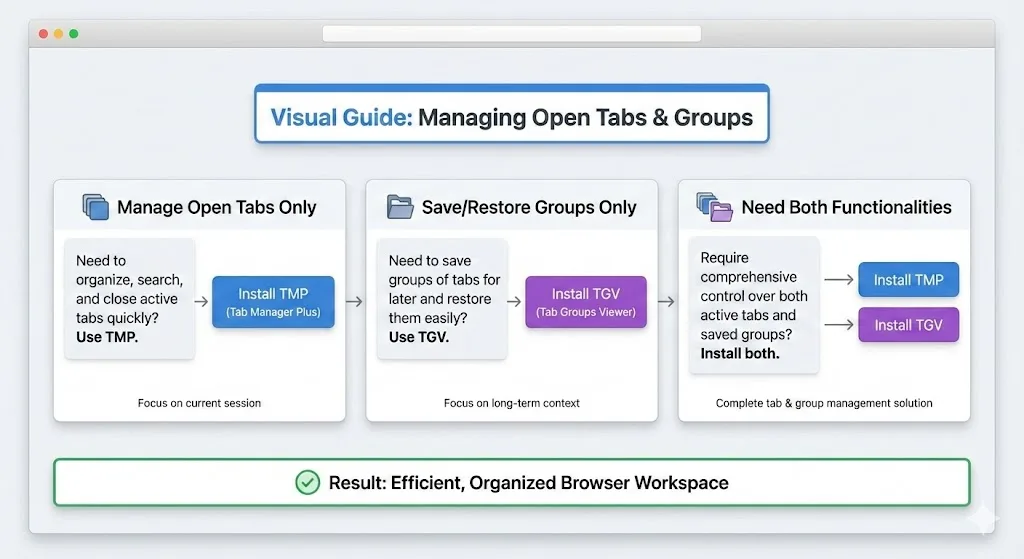
Tab Manager Plus and TabGroup Vault sound like they should be competitors, but they actually solve different problems at different moments in your browsing workflow.
Tab Manager Plus is a real-time tab navigation tool. It gives you a popup window or panel that shows every open tab across all your Chrome windows. You can search, filter, rearrange, pin, close, and switch between tabs from this single view. Think of it as a supercharged replacement for Chrome's built-in tab bar.
TabGroup Vault is a backup and restore tool. It takes snapshots of your tab group layout so you can close everything and bring it back later -- with all group names, colors, and tab positions intact. Think of it as version control for your browser workspace.
One helps you work with tabs that are currently open. The other helps you preserve tabs for the future. These are fundamentally different jobs.
Feature-by-Feature Comparison
| Feature | TabGroup Vault | Tab Manager Plus |
|---|---|---|
| Primary Purpose | Backup and restore tab groups | Navigate and manage open tabs |
| Tab Group Support | Full save/restore of groups | Can display group info |
| Save Tabs for Later | Yes (snapshots) | No |
| Restore Saved Tabs | Yes (full group structure) | No |
| Search Open Tabs | No | Yes (real-time search) |
| Close Tabs from Panel | No | Yes |
| Rearrange Tabs | No | Yes (drag and drop) |
| Cross-Window View | No | Yes (all windows in one panel) |
| Cloud Backup | Google Drive | No |
| Snapshot History | Yes | No |
| Multi-Profile | Up to 5 profiles | No |
| Pricing | Free (5 snapshots) / $29 lifetime | Free (open source) |
| Source Code | Proprietary | Open source (GitHub) |
Where Tab Manager Plus Wins
Real-Time Tab Overview
Tab Manager Plus gives you a bird's-eye view of every open tab across all Chrome windows. When you have 50 or 100 tabs open, Chrome's built-in tab bar becomes unusable -- tabs shrink to tiny slivers and you cannot read titles. Tab Manager Plus solves this with a searchable list or grid that shows full titles and favicons.
Tab Search
Start typing in Tab Manager Plus, and it filters your open tabs in real time. If you know you have a GitHub tab open somewhere but cannot find it in your sea of tabs, searching "github" instantly highlights it. This is faster than scanning through Chrome's tab bar or using keyboard shortcuts to cycle through tabs one by one.
Batch Operations
Tab Manager Plus lets you select multiple tabs and close them, move them to a new window, or pin them all at once. This is useful for periodic tab cleanup when you want to close a dozen tabs from a research session that is finished.
Free and Open Source
Tab Manager Plus is completely free with no paid tier, no feature gates, and no tracking. Its code is open source on GitHub, which means anyone can audit it, contribute to it, or fork it. For users who value transparency, this is a strong point.
When Tab Manager Plus Is the Right Choice
If your main problem is navigating and managing the tabs you currently have open -- finding specific tabs, closing groups of tabs, or getting an overview of all your windows -- Tab Manager Plus is purpose-built for that job.
Where TabGroup Vault Wins
Saving Tab Groups for Later
This is the fundamental capability Tab Manager Plus does not have. When you close Chrome, switch projects, or need a clean slate, TabGroup Vault lets you save your current tab group layout and restore it later. Tab Manager Plus only works with tabs that are currently open -- once a tab is closed, it is gone from Tab Manager Plus entirely.
Tab Group Structure Preservation
TabGroup Vault captures not just which tabs are open, but how they are organized: group names, colors, and which tabs belong to each group. When you restore a snapshot, the entire organizational structure comes back. Tab Manager Plus can display group information for open tabs, but it cannot save or rebuild that structure from a saved state.
Cloud Backup and Recovery
TabGroup Vault's Google Drive integration means your saved tab groups survive Chrome crashes, reinstalls, and computer changes. Tab Manager Plus has no persistence layer -- it works exclusively with your current browser state.
Snapshot History
TabGroup Vault maintains a timeline of all your snapshots. You can go back to how your workspace looked yesterday, last week, or last month. This is useful when a project evolves and you want to reference an earlier set of resources.
Better Together: The Complementary Argument
Here is the insight that makes this comparison different from most: these two extensions work well together. They do not overlap in functionality, they do not conflict technically, and they address different moments in your workflow.
A combined workflow might look like this:
- Start of day: Use TabGroup Vault to restore yesterday's workspace. All your tab groups come back with names, colors, and tabs in place.
- During the day: Use Tab Manager Plus to search through your open tabs, close finished ones, and navigate efficiently between projects.
- End of day: Use TabGroup Vault to take a snapshot of your current layout before closing Chrome.
Tab Manager Plus handles the present. TabGroup Vault handles the past and future. Together, they cover the full lifecycle of your browser tabs.
TabGroup Vault Quick Facts
Price: Free (5 snapshots) / $29 one-time lifetime Pro
Purpose: Save and restore Chrome tab group layouts
Backup: Google Drive integration for cloud safety
Profiles: Up to 5 Chrome profiles supported
Who Should Choose What
Choose Tab Manager Plus if:
- Your main problem is navigating too many open tabs
- You need to search, filter, and manage tabs in real time
- You want a free, open-source tool with no strings attached
- You do not need to save tabs for later -- you just need to manage what is open now
Choose TabGroup Vault if:
- Your main problem is losing tab groups when Chrome closes, crashes, or updates
- You need to save your workspace layout and restore it later
- You want cloud backup for your tab groups via Google Drive
- You use multiple Chrome profiles and need cross-profile support
Choose both if:
- You keep many tabs open AND want to save your workspace for later
- You want real-time tab navigation AND long-term tab group backup
- You are willing to install two focused tools instead of one mediocre all-in-one
The Verdict
Comparing Tab Manager Plus and TabGroup Vault is a bit like comparing a car's steering wheel to its parking brake. One helps you drive; the other keeps things safe when you stop. Both are necessary, and neither replaces the other.
If you must choose just one, pick based on your primary pain point: real-time navigation (Tab Manager Plus) or backup and restore (TabGroup Vault). But if you can install both, you get a more complete tab management setup than either extension provides alone.