Can you collapse Chrome Tab Groups with the keyboard?
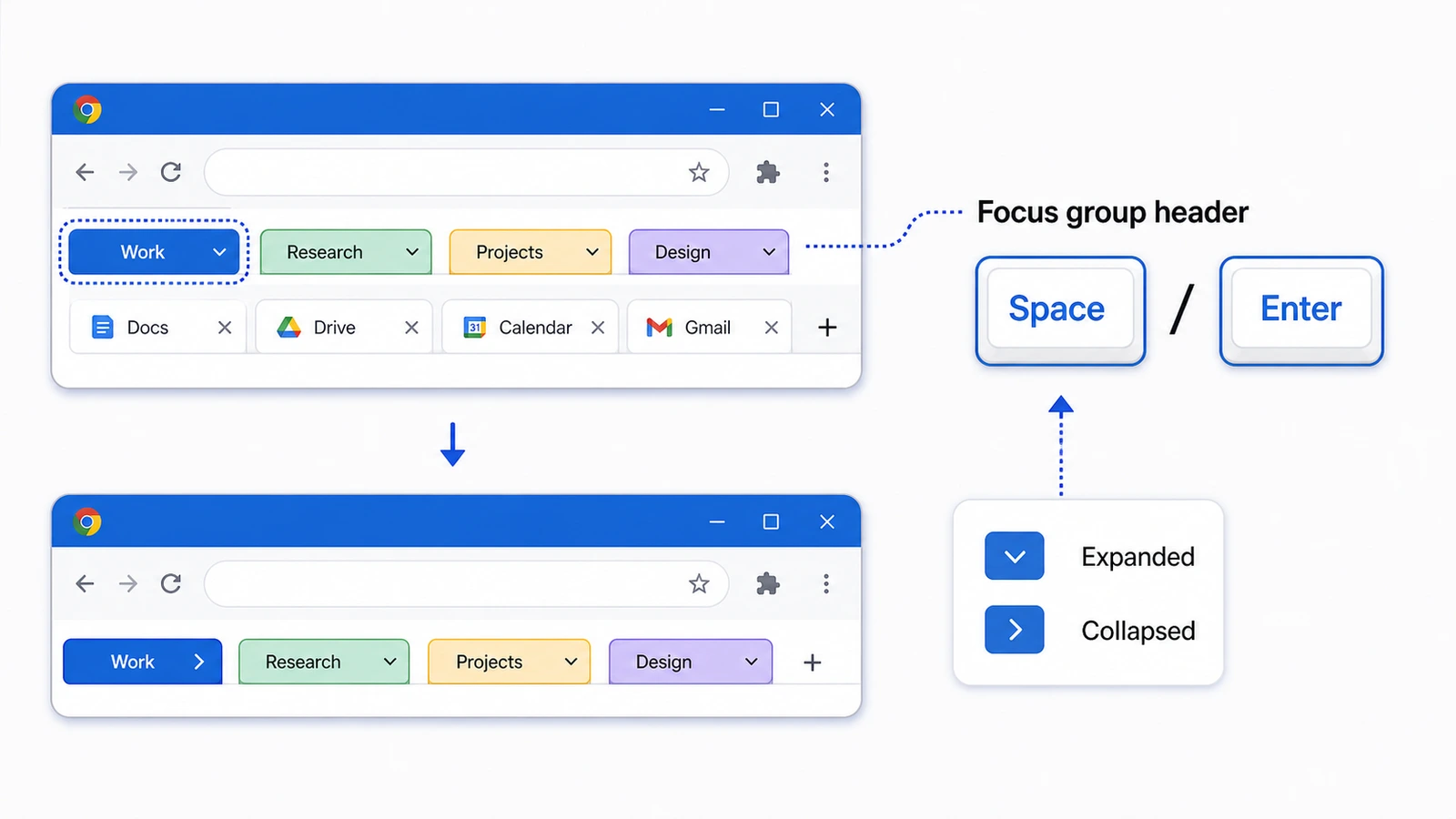
Yes. First move focus to the Tab Group header, then press Space or Enter. Chrome treats this as a focused Tab-strip control, not a global shortcut you can press from any page.
Focus is the whole trick. If your cursor is inside a page, move keyboard focus to the Tab strip and then to the Group header. With a mouse, the plain route is still faster: click the Group name or colored circle.
chrome://extensions/shortcuts is a different tool. It configures extension commands, including shortcuts exposed by TabGroup Vault, but it does not remap Chrome's built-in Tab Group behavior.
| Task | Shortcut or place | What it does |
|---|---|---|
| Collapse or expand a Tab Group | Focus the Group header, then press Space or Enter | Collapses or expands the focused Chrome Tab Group. |
| Set extension shortcuts | chrome://extensions/shortcuts | Configures extension commands. It does not remap native Chrome Tab Group controls. |
| Open a new Tab | Ctrl+T on Windows/Linux/Chromebook, Command+T on Mac | Opens a new Chrome Tab. Chrome does not document a separate desktop shortcut for opening a new Tab inside the current Group. |
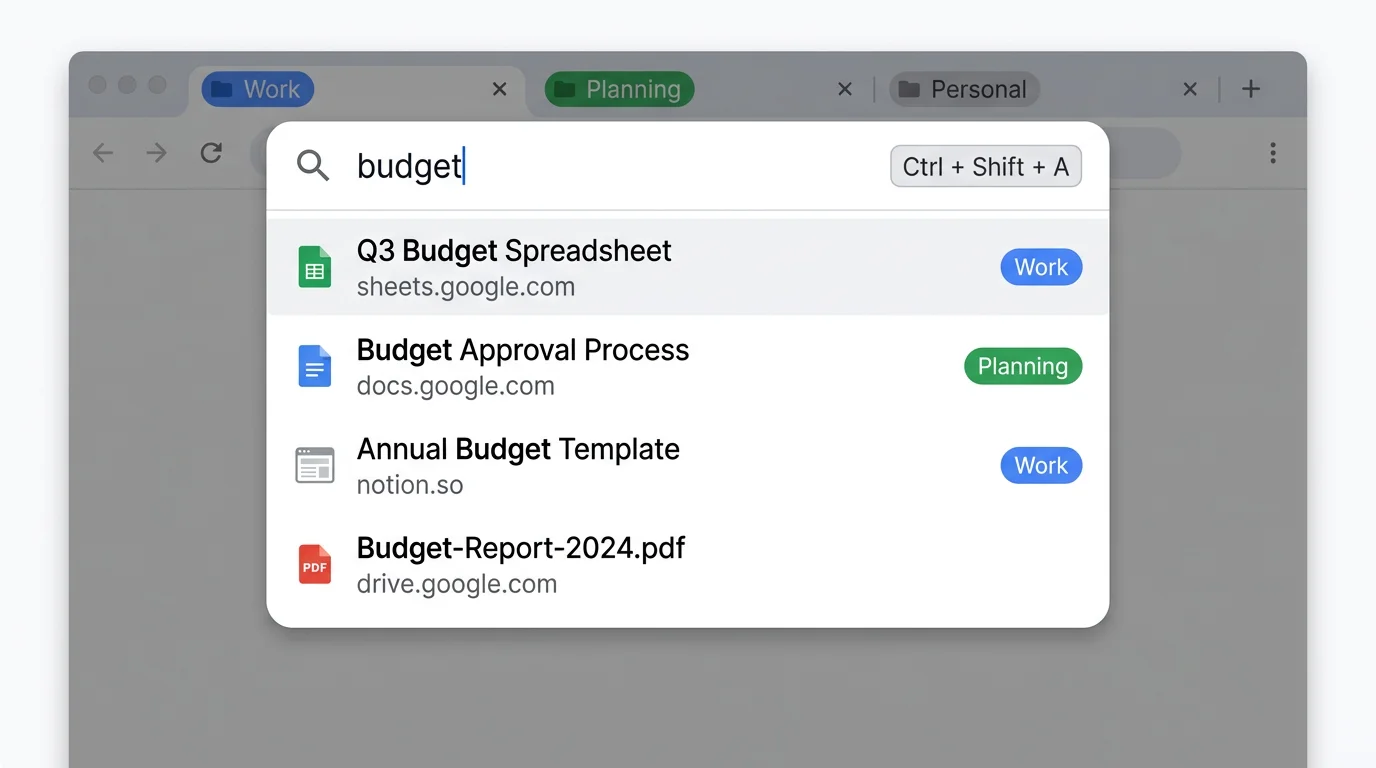
| Search open Tabs | Ctrl+Shift+A on Windows/Linux, Command+Shift+A on Mac | Opens Tab Search so you can find an open Tab without expanding every Group. |
Collapse or expand a Chrome Tab Group
Use these steps when you want to collapse a Chrome Tab Group from the keyboard instead of clicking the Group label.
| Platform | Keyboard steps | Result |
|---|---|---|
| Windows / Linux | Press F6 until the Tabs are focused, use Tab or Shift+Tab to reach the Group header, then press Space or Enter. | Collapse or expand the focused Tab Group. |
| Chromebook | Move focus to the Tab strip and Group header, then press Space or Enter. | Collapse or expand the focused Tab Group. |
| Mac | Turn VoiceOver on for Chrome's official Tab Group keyboard workflow. Focus the Tab Group header, then press Space or Enter. | Collapse or expand the focused Tab Group. |
Direct answer
The Chrome Tab Group collapse shortcut is Space or Enter after the Group header has focus. If the page has focus, move focus to the Tab strip and Group header first.
Set extension shortcuts at chrome://extensions/shortcuts
Chrome extensions can define keyboard commands, and you can add or remap those commands from chrome://extensions/shortcuts. That page is for commands exposed by installed extensions. It does not remap built-in Chrome shortcuts, including Chrome's Tab Group controls.
Set up extension shortcuts
- Navigate to chrome://extensions/shortcuts in your address bar.
- Find the extension you want to configure, such as TabGroup Vault.
- Click the pencil icon next to the shortcut field.
- Press the keys you want to assign.
- Choose whether the shortcut works in Chrome or globally, if Chrome shows that option for the command.
Extension shortcuts have guardrails. Chrome command shortcuts must include Ctrl or Alt. On macOS, Ctrl maps to Command unless the extension specifies MacCtrl. Some Chrome and operating system shortcuts take priority, and Ctrl+Alt combinations are not permitted for extension commands.
TabGroup Vault shortcuts
TabGroup Vault supports keyboard shortcuts through chrome://extensions/shortcuts. Use them for TabGroup Vault actions such as saving or exporting snapshots. Chrome's native collapse and expand action still starts at the Group header.
| Feature | What to Check |
|---|---|
| Reopen a Closed Tab | Windows/Linux: Ctrl+Shift+T. macOS: Command+Shift+T. This cannot recover data that is no longer available. |
| Find a Tab or History Entry | Use Chrome Tab search or History. History: Ctrl+H on Windows/Linux, Command+Y on macOS. No fixed productivity multiplier follows from using shortcuts. |
| Extension Shortcuts | Only commands declared by the installed extension appear in chrome://extensions/shortcuts. Do not assume a save/restore command exists for every tool. |
Sources Checked October 1, 2026: Chrome Shortcuts · Chrome Help
What Chrome supports
Chrome has keyboard-accessible Tab Group controls. Its main shortcut list does not show one shortcut that collapses or expands the current Tab Group while a page has focus.
| Action | Keyboard support | What to know |
|---|---|---|
| Collapse or expand a Group | Yes, after focusing the Group header | Press Space or Enter on the focused Tab Group header. |
| Create a Tab Group | Yes, through Chrome's Tab Group keyboard workflow | Chrome documents keyboard access for creating Tab Groups and opening the Tab Group menu. |
| Add or remove Tabs from a Group | Yes, through the Tab Group menu workflow | Use Chrome's keyboard-accessible Tab Group menu after focusing the relevant Tab or Group. |
| Move a focused Tab or Tab Group | Yes, through Chrome's Tab Group keyboard workflow | After focus is on a Tab or Tab Group, Ctrl+Left arrow and Ctrl+Right arrow move the focused item. |
| Collapse the current Group from page focus | No one-step Chrome shortcut listed | Move focus to the Group header first. Use extension shortcuts for extension actions. |
| Open a new Tab in the current Group | No separate official desktop shortcut confirmed | Ctrl+T or Command+T opens a new Tab. Extensions and context menus may add options, but that is not Chrome's standard shortcut behavior. |
Chrome Tab shortcuts worth keeping handy
These standard Chrome shortcuts still work with grouped Tabs, including Tabs inside collapsed Groups.
| Action | Windows / Linux | Mac |
|---|---|---|
| Open new Tab | Ctrl + T | Command + T |
| Close current Tab | Ctrl + W | Command + W |
| Reopen last closed Tab | Ctrl + Shift + T | Command + Shift + T |
| Switch to next Tab | Ctrl + Tab | Command + Option + Right Arrow |
| Switch to previous Tab | Ctrl + Shift + Tab | Command + Option + Left Arrow |
| Go to specific Tab (1-8) | Ctrl + 1 through Ctrl + 8 | Command + 1 through Command + 8 |
| Go to last Tab | Ctrl + 9 | Command + 9 |
| Move Tab left | Ctrl + Shift + Page Up | Use the Tab menu or drag with the pointer. |
| Move Tab right | Ctrl + Shift + Page Down | Use the Tab menu or drag with the pointer. |
| Search open Tabs | Ctrl + Shift + A | Command + Shift + A |
Use Tab Search before expanding everything
Ctrl+Shift+A on Windows and Linux, or Command+Shift+A on Mac, opens Chrome's Tab search panel. It helps find open Tabs, including Tabs inside collapsed Groups, but it does not collapse Groups.
Short notes on vertical Tabs and Edge
Google announced Chrome vertical Tabs on April 7, 2026, and Chrome Help now documents ways to show Tabs vertically. That does not change the documented Tab Group shortcut: focus the Group header, then press Space or Enter.
Microsoft says Edge can switch vertical Tabs with Ctrl+Shift+, and mentions Tab Groups, but that is an Edge layout shortcut, not a Chrome Tab Group collapse shortcut. Microsoft's official Edge keyboard shortcut list did not show a dedicated Tab Group collapse/expand shortcut in the checked list.
A practical shortcut workflow
A keyboard-heavy Chrome setup works best when native Tab shortcuts handle Chrome behavior and extension shortcuts handle extension actions.
Morning setup
- Press your custom extension shortcut to open TabGroup Vault or save a snapshot.
- Restore yesterday's snapshot with a click.
- Use Ctrl+Shift+A, or Command+Shift+A on Mac, to search for the Tab you want to start with.
During work
- Use Ctrl+Tab and Ctrl+Shift+Tab to navigate between Tabs within your current Group.
- Use Ctrl+1 through Ctrl+8 to jump to specific Tab positions.
- When you need to find a Tab in a collapsed Group, use Tab Search instead of expanding every Group.
- When you need to collapse or expand a Group, focus the Group header and press Space or Enter.
End of day
- Press your custom snapshot shortcut to save the current Window.
- Close Chrome knowing your Tab Groups are stored outside the Session.
When you need more than collapse and expand
For the broader Tab Group shortcut workflow, see our Chrome Tab Groups keyboard shortcuts guide. If you mainly want a faster way to save and reopen Groups across Sessions, read whether Chrome Tab Groups save when you close Chrome. If you are trying to preserve a whole set of Tabs, the bookmark all Tabs in Chrome guide covers that job.
For keyboard users, the setup is simple: use Chrome's focused controls for native Tab Group actions, use Tab Search to jump across grouped Tabs, and use chrome://extensions/shortcuts for extension actions.