The Freelancer's Browser Problem
Freelancing has a unique browser challenge that full-time employees rarely face: complete separation between client worlds. Each client has their own project management system, their own communication channels, their own documentation, and their own tools. A freelance designer might have Figma for Client A, Sketch for Client B, and Canva for Client C -- all open at the same time alongside each client's Slack, email threads, and feedback documents.
The result is browser chaos that directly affects your billable hours. Every minute you spend searching for the right tab, logging into the wrong client's system, or reconstructing a workspace after a crash is time you cannot invoice. For freelancers, browser disorganization is not just an annoyance. It is lost revenue.
This guide covers the browser extensions that address the specific needs of freelancers: client project management, time tracking, invoicing, and the browser organization layer that ties everything together.
Client Project Organization
Tab Groups Per Client
The single most impactful change a freelancer can make is creating a dedicated Chrome tab group for each active client. Color-code each group with the client's brand color (or any distinguishing color) and name it with the client name or project name.
A typical freelancer's tab group setup:
| Tab Group | Color | Typical Tabs |
|---|---|---|
| Acme Corp | Blue | Jira board, Google Drive folder, Figma project, Slack DM |
| Smith & Co | Green | Trello board, Shared Docs, staging site, email thread |
| Johnson LLC | Purple | Notion workspace, GitHub repo, dev environment, client portal |
| My Business | Orange | Invoice tool, bank, portfolio, personal email |
| Prospecting | Yellow | Job boards, proposals in progress, LinkedIn |
Collapse the groups you are not actively working on. This keeps your browser visually clean and makes it obvious which client you are focused on at any given moment.
TabGroup Vault for Client Workspace Backup
Setting up these client tab groups takes time -- finding the right tabs, logging into client systems, arranging everything logically. Losing this setup to a crash or accidental close is painful. TabGroup Vault saves your tab group configuration so you can restore it instantly.
TabGroup Vault
What it does: Saves and restores Chrome tab groups with full color, name, and URL preservation. Price: Free (5 snapshots) / $29 lifetime Pro (unlimited snapshots, bulk restore, Google Drive backup, 5 Chrome profiles, dark theme). For freelancers: Save a snapshot for each client engagement. When a client's project is on hold, close the tab group entirely and restore it when work resumes. This keeps your browser lean without losing any setup.
Time Tracking Extensions
Accurate time tracking is the foundation of freelancer income. Whether you bill hourly or use tracked time for project estimates, these extensions make tracking effortless.
Toggl Track
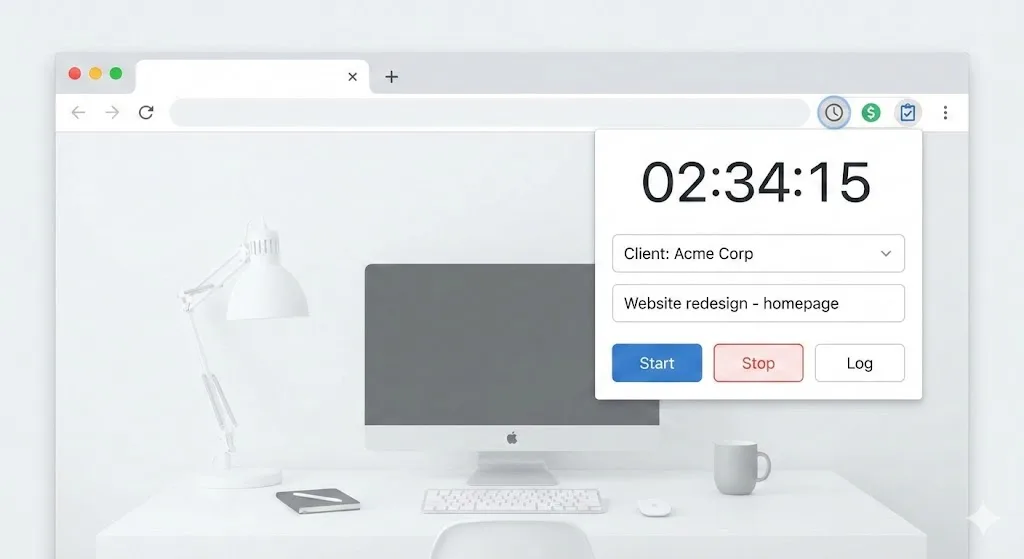
Toggl's Chrome extension is the most widely used time tracker among freelancers. It integrates with over 100 web tools, adding a timer button directly inside Jira, Trello, Asana, GitHub, Google Docs, and many more. You assign each time entry to a client and project, then generate invoicing-ready reports.
The key feature for freelancers is the project-based reporting. At the end of a billing cycle, you can export a detailed time report filtered by client, showing exactly what you worked on and for how long.
Price: Free (basic tracking) / $9/month Starter (billable rates, project estimates).
Clockify
Clockify offers a more generous free tier than Toggl, with unlimited tracking, projects, and users. The Chrome extension adds a timer overlay to every web page, and the dashboard provides visual breakdowns of time by project. For freelancers on a tight budget, Clockify's free plan covers everything you need until you reach higher volumes.
Price: Free / $3.99/month Basic (time off, targets).
Harvest
Harvest combines time tracking with invoicing in a single platform. Track time from the Chrome extension, then generate and send invoices directly from your time entries. This eliminates the manual step of transferring time data to an invoicing tool. Harvest also integrates with Stripe and PayPal for payment collection.
Price: Free (1 project, 2 seats) / $10.80/seat/month Pro.
Invoicing and Payments
Wave
Wave is a free accounting and invoicing platform that runs entirely in the browser. Create professional invoices, track expenses, and accept payments. The interface is clean and the free tier is useful -- no artificial limitations to push you toward a paid plan. For freelancers who do not want to pay for QuickBooks, Wave is the best alternative.
Price: Free (invoicing and accounting) / pay-per-use for payment processing.
FreshBooks
FreshBooks is the premium option for freelancer invoicing. It offers time tracking, expense tracking, invoicing, and project management in a single platform. The browser-based interface is polished and client-facing features like client portals and automated payment reminders save time on follow-ups.
Price: $17/month Lite (5 clients) / $30/month Plus (50 clients).
Communication and Client Management
Loom
Loom is indispensable for freelancers. Instead of scheduling a call to walk a client through a design revision, record a 3-minute Loom video showing your screen with audio narration. Clients can watch on their own time and leave timestamped comments. This reduces meeting overhead, especially across time zones.
Price: Free (25 videos) / $12.50/month Business.
Calendly
Client scheduling is one of the most time-consuming non-billable activities for freelancers. Calendly eliminates the back-and-forth by letting clients book time directly on your calendar. Set availability windows, buffer times between meetings, and limits on daily meetings. The Chrome extension lets you insert your scheduling link into any email with one click.
Price: Free (1 event type) / $10/month Standard.
Grammarly
Professional communication matters for freelancers. Every client email, proposal, and project update represents your brand. Grammarly catches errors, improves clarity, and adjusts tone in real-time across Gmail, Google Docs, and virtually every text field in Chrome.
Price: Free / $12/month Premium.
Focus and Productivity
Freedom
Freelancers face unique distraction challenges because there is no manager looking over your shoulder. Freedom blocks distracting websites across all your devices during scheduled focus blocks. Set recurring sessions during your most productive hours to protect deep work time.
Price: $3.33/month (annual plan).
Momentum
Momentum replaces your new tab page with a focus dashboard. Each time you open a new tab, you see your main task for the day instead of a blank page or news feed. For freelancers who open dozens of new tabs daily, this micro-reminder adds up.
Price: Free / $3.33/month Plus.
The Complete Freelancer Browser Toolkit
| Need | Tool | Price | ROI |
|---|---|---|---|
| Tab Organization | TabGroup Vault | Free / $29 lifetime | Saves 15-30 min/day in workspace setup |
| Time Tracking | Toggl Track | Free / $9/mo | Ensures accurate billing |
| Invoicing | Wave | Free | Saves $20-30/mo vs. paid alternatives |
| Client Calls | Calendly | Free / $10/mo | Eliminates scheduling emails |
| Async Video | Loom | Free / $12.50/mo | Replaces meetings |
| Focus | Freedom | $3.33/mo | Protects billable hours |
| Writing | Grammarly | Free / $12/mo | Professional client communication |
Cost Perspective
The entire toolkit above costs roughly $30-65/month if you go with paid tiers (or as little as $29 one-time + free tiers). For a freelancer billing $50-150/hour, recovering even 30 minutes of billable time per day pays for the entire stack many times over.
Building Your Freelancer Workflow
Here is a practical daily workflow using the tools above:
- Morning: Open Chrome, restore your tab group snapshot from TabGroup Vault. Check your calendar for today's meetings and deadlines.
- Focus block: Expand the tab group for your priority client. Start your Toggl timer. Activate Freedom to block distractions.
- Client switch: Stop the timer, collapse the current tab group, expand the next client's group, start a new timer assigned to the new client.
- Communication: Record Loom videos for client updates instead of scheduling calls. Send proposals and emails with Grammarly active.
- End of day: Stop all timers. Review your Toggl report to confirm hours are correctly allocated. Save a fresh tab group snapshot.
- End of week: Generate time reports per client. Send invoices through Wave or Harvest.
The Bottom Line
Freelancer productivity comes down to two things: maximizing billable hours and minimizing administrative overhead. The browser extensions in this guide attack both sides. Tab groups and TabGroup Vault minimize context-switching time. Time trackers ensure you bill for every minute. Invoicing tools eliminate manual busywork. Communication tools reduce unnecessary meetings.
Start with the tools that address your biggest time drain. For most freelancers, that is client workspace organization -- the simple act of separating your browser by client with tab groups eliminates the daily confusion of mixed tabs across multiple projects. Learn more about managing multiple projects or setting up your Chrome workspace.