The Case for Rethinking Your Browser
| Feature | What to Check |
|---|---|
| Arc | Spaces separate browsing contexts. Arc Sync documents Spaces, Folders, and Tabs; these are not identical to Chrome Group backups. |
| TabGroup Vault | Save Group backups and whole Sessions. Local data; optional Pro Drive backup and Window-close auto-save. Keep an export outside the Profile. |
Sources Checked October 1, 2026: Arc Spaces · Arc Sync · TabGroup Vault Features
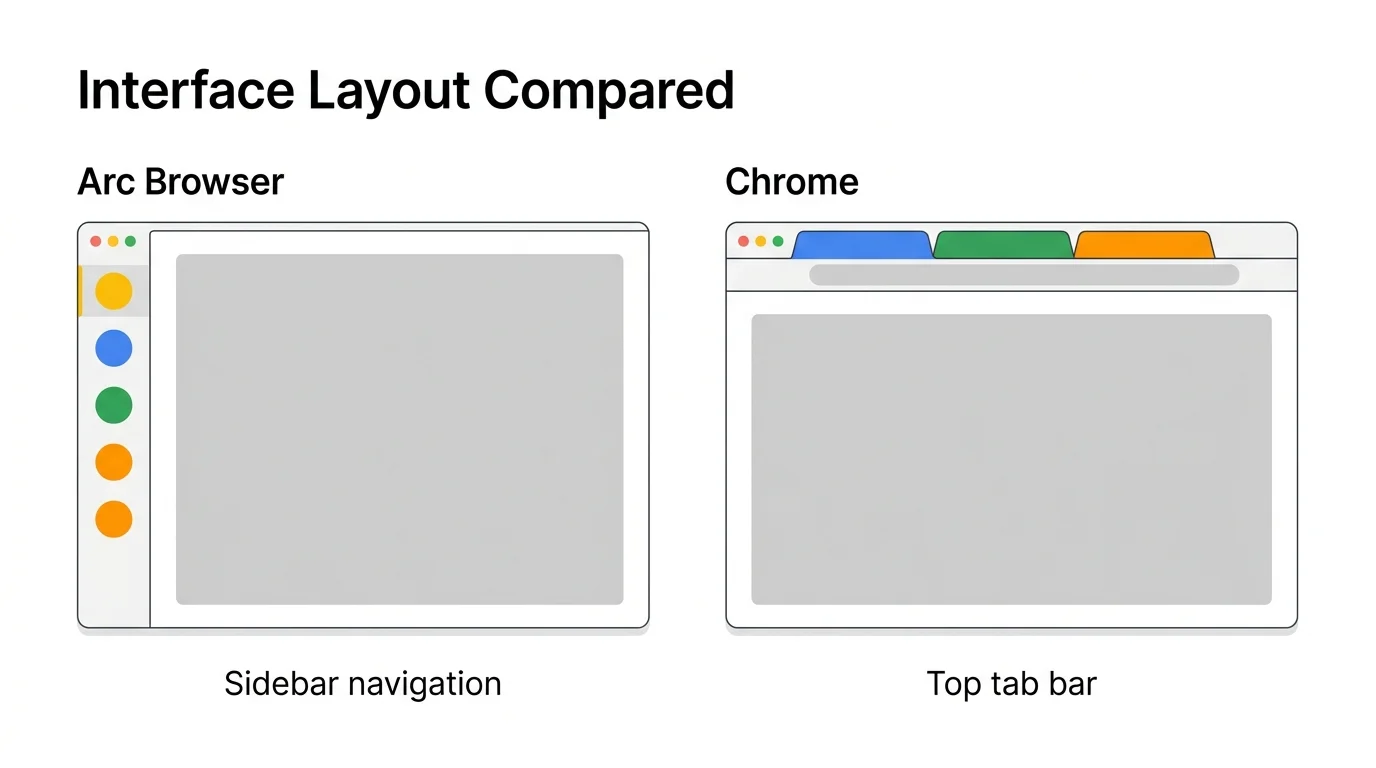
Arc Browser, built by The Browser Company, arrived with a bold promise: a browser redesigned from scratch for how people actually work today. Instead of the traditional Tab bar across the top, Arc uses a sidebar with Spaces, pinned Tabs, automatic Tab archiving, and a fundamentally different approach to organizing your browsing.
For people frustrated with Chrome's Tab management, Arc is appealing. But switching browsers is a significant commitment that affects everything from saved passwords to extension compatibility. The question is not just whether Arc is better at Tabs -- it is whether the improvement justifies the migration cost.
What Arc Gets Right About Tab Management
Arc introduced several Tab management concepts that Chrome does not have natively:
Spaces
Arc's Spaces are like workspaces within a single browser Window. Each Space can have its own set of pinned Tabs, color theme, and browsing context. Switching between Spaces swaps your entire Tab environment. This is built into the browser itself, not bolted on through an extension.
Automatic Tab Archiving
Arc automatically archives Tabs you have not used for a set period (12 hours by default). Archived Tabs move out of your sidebar into a searchable archive. This prevents Tab buildup without requiring manual cleanup.
Sidebar Navigation
Arc moves Tabs from a horizontal bar at the top to a vertical sidebar on the left. This gives you more space for Tab titles (since titles are displayed vertically rather than squeezed into tiny horizontal Tabs) and keeps your most important Tabs pinned and visible.
As of Chrome 146 (March 2026), Chrome now offers native vertical Tabs. Right-click the Tab strip and select "Turn on vertical Tabs." While Arc's implementation remains more polished with its sidebar-first design, Chrome users no longer need to switch browsers for this feature alone.
Split View
Arc lets you split your browser Window to show two pages side by side without needing a separate Window. This is useful for referencing documentation while working, or comparing two pages.
Chrome 145 introduced Split View, allowing two Tabs side-by-side. Right-click a link and select "Open Link in Split View." This matches Arc's split view capability.
What Chrome Gets Right
Chrome's advantages are not about flashy features -- they are about ecosystem and reliability:
Extension Ecosystem
Chrome has the largest extension library of any browser. Whatever workflow you need, there is likely an extension for it. Arc supports Chrome extensions (it is Chromium-based), but some extensions do not work perfectly in Arc's modified interface, and Arc's extension management is less mature.
Enterprise and IT Support
Chrome is the standard in most workplaces. IT departments manage Chrome policies, deploy Chrome updates, and build internal tools for Chrome. Using Arc in a managed enterprise environment can create friction or may not be permitted at all.
Website Compatibility
Chrome is the browser most web developers test against. While Arc uses the same Chromium engine, its modified interface occasionally causes layout issues on sites that expect standard Chrome behavior.
Stability and Track Record
Chrome has been the dominant browser for over a decade. Its bugs are well-documented and quickly fixed. Arc, while promising, is newer and still evolving. The Browser Company has also shifted focus toward other products, which raises questions about Arc's long-term development trajectory.
Feature Comparison
| Feature | Chrome (+ Extensions) | Arc Browser |
|---|---|---|
| Tab Groups | Native (names, colors) | Spaces (similar concept) |
| Tab Backup/Restore | Via extensions (e.g., TabGroup Vault) | Limited (Spaces persist) |
| Auto-Archive Tabs | No (needs extension) | Built-in |
| Sidebar / Vertical Tabs | Native (Chrome 146) | Built-in (sidebar-first design) |
| Split View | Native (Chrome 145) | Built-in |
| Extension Support | Full Chrome Web Store | Most Chrome extensions (some issues) |
| Profiles | Full multi-profile support | Built-in Profiles within Spaces |
| Cloud Sync | Google Account sync | Arc Account sync |
| Enterprise Support | Extensive (IT policies, MDM) | Limited |
| Platform Availability | Windows, Mac, Linux, iOS, Android | Mac, Windows, iOS |
| Memory Management | Built-in Memory Saver | Auto-archive reduces memory |
| Price | Free | Free |
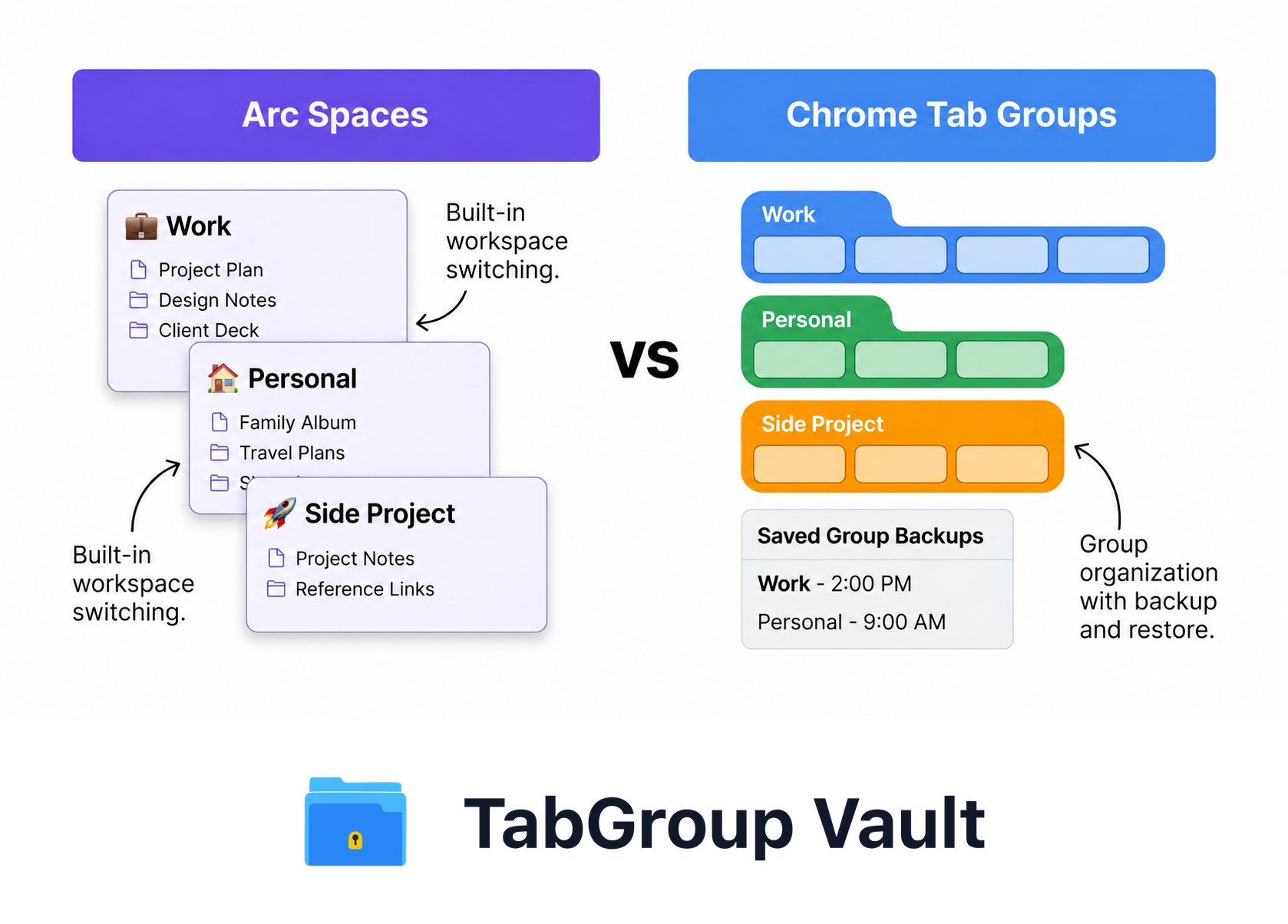
Illustrative example; layout and sample data are conceptual.
Can Chrome + Extensions Match Arc's Tab Management?
This is the practical question. Can you get Arc-like organization without leaving Chrome?
The short answer: mostly yes, though with some trade-offs. Here is how to replicate Arc's key Tab management features in Chrome:
Arc Spaces = Chrome Tab Groups + TabGroup Vault
Chrome's native Tab Groups give you named, color-coded collections of Tabs -- conceptually similar to Arc's Spaces. The missing piece is persistence: Chrome Tab Groups can vanish after crashes or updates.
TabGroup Vault fills this gap. It saves your Tab Group layout as a snapshot and restores it on demand. Your Groups survive crashes, updates, and restarts. This gives you Arc-like workspace persistence within Chrome.
Arc Auto-Archive = Chrome Memory Saver + Manual Habits
Chrome's Memory Saver automatically suspends inactive Tabs, which partially addresses Tab buildup. For true auto-archiving (removing Tabs from view entirely), you would need to build a habit of periodically saving snapshots with TabGroup Vault and closing finished Groups. It is not as automatic as Arc, but it is effective with discipline.
Arc Sidebar = Chrome Vertical Tabs
With Chrome 146's native vertical Tabs, Chrome now has its own sidebar-style Tab layout. Right-click the Tab strip and select "Turn on vertical Tabs" to move your Tabs to a collapsible sidebar with full Tab titles and a dedicated search bar. Combined with Tab Group collapse, this delivers an experience close to Arc's sidebar navigation. Arc's sidebar is still more refined -- it was designed from the ground up as a sidebar-first interface -- but Chrome's implementation covers the core need.
Arc Split View = Chrome Split View
Chrome 145 added native Split View. Right-click any link and select "Open Link in Split View" to display two Tabs side by side in the same Window. This directly matches Arc's split view and eliminates one of Arc's previous unique advantages.
The Chrome Enhancement Stack
To get the closest experience to Arc's Tab management in Chrome:
1. Turn on vertical Tabs (Chrome 146) for sidebar-style navigation
2. Use Chrome Tab Groups for workspace organization
3. Install TabGroup Vault for Group backup and restore ($39 lifetime)
4. Enable Memory Saver for automatic Tab suspension
5. Use Split View (Chrome 145) for side-by-side browsing
This setup provides workspace organization, persistence, vertical Tabs, split view, and memory management without switching browsers.
The Switching Cost
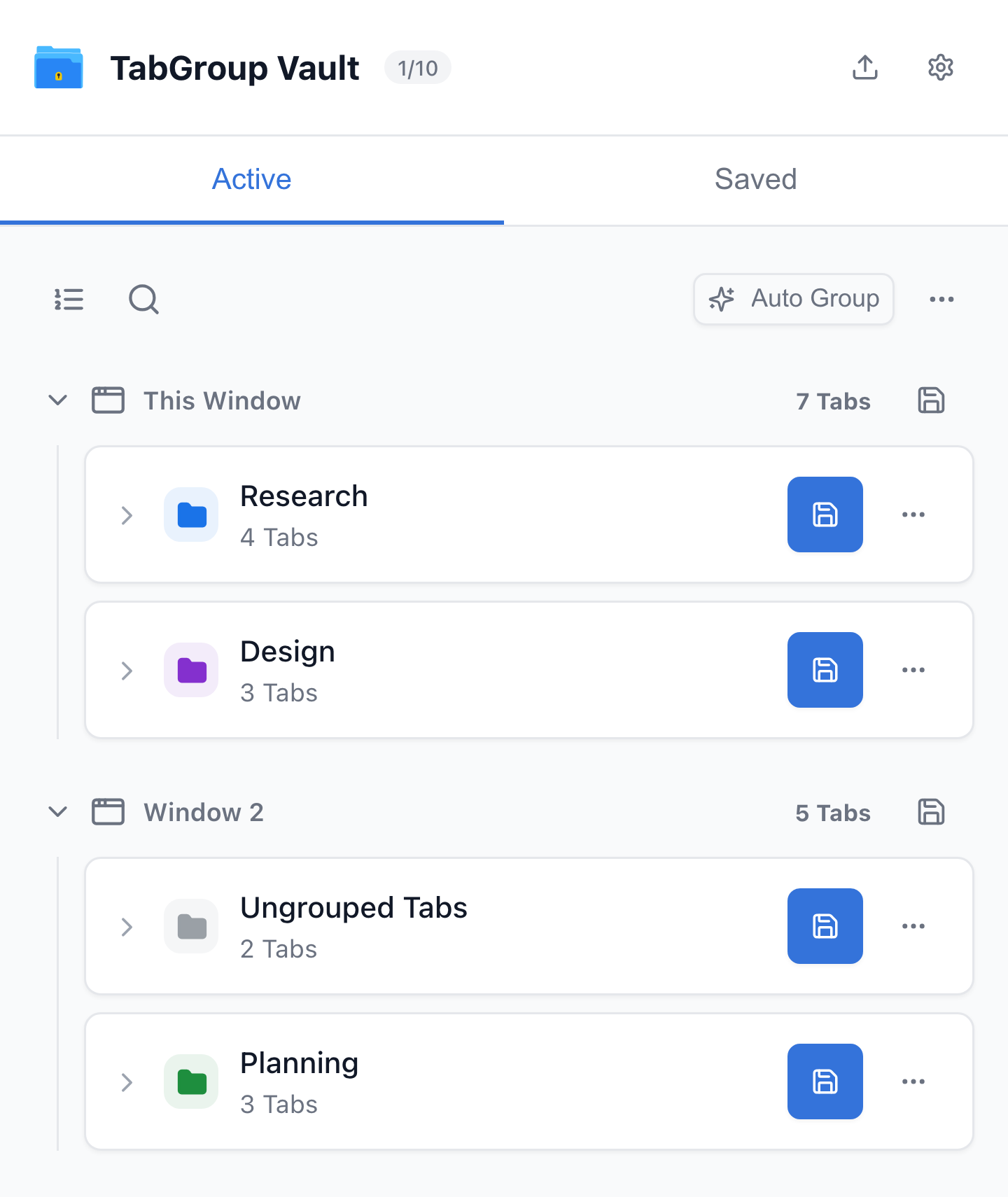
Current TabGroup Vault Active Windows view with deterministic sample data. This capture demonstrates the interface, not a live cloud or crash-recovery test.
Switching browsers is not a casual decision. Here is what migrating from Chrome to Arc actually involves:
- Passwords and autofill: You need to migrate or re-enter your saved passwords and payment methods.
- Extensions: Most Chrome extensions work in Arc, but some may not function correctly in Arc's modified interface. You need to test each one.
- Muscle memory: Arc's keyboard shortcuts, navigation patterns, and interface layout are all different. Expect a learning curve of days to weeks.
- Synced data: Chrome sync ties together bookmarks, history, open Tabs, and settings across devices. Arc has its own sync, but migrating that data is not seamless.
- Work restrictions: If your workplace manages Chrome via IT policies, switching to Arc may not be an option.
These costs are real. For some users, Arc's Tab management improvements justify the switch. For many others, enhancing Chrome with extensions is the more practical path.
TabGroup Vault: Arc-Like Persistence for Chrome
What it does: Saves and restores Chrome Tab Groups with full structure (names, colors, Tabs)
Price: Free (10 snapshots) / $39 one-time lifetime Pro
Backup: Google Drive integration for cross-device safety
Result: Your Chrome Tab Groups persist like Arc's Spaces, without switching browsers
Chrome's Recent Catch-Up (2026)
In early 2026, Chrome shipped two features that significantly narrowed the gap with Arc:
- Chrome 145 (February 2026) -- Split View: Chrome now lets you view two Tabs side-by-side in the same Window. Right-click any link and select "Open Link in Split View." This directly matches Arc's built-in split view, eliminating the need for separate Windows or OS-level Window snapping.
- Chrome 146 (March 2026) -- Native Vertical Tabs: Chrome's Tab strip can now move to a collapsible sidebar. Right-click the Tab strip and select "Turn on vertical Tabs" to get full Tab titles, a dedicated search bar, and a sidebar layout. While Arc's sidebar-first design remains more polished and deeply integrated, Chrome users now have a native alternative.
These additions mean that two of Arc's biggest selling points -- vertical Tabs and split view -- are no longer exclusive. Arc still leads with Spaces, auto-archiving, Boost (custom CSS injection), and its cohesive sidebar-first design philosophy. But for users who were considering Arc primarily for vertical Tabs or split view, Chrome now covers those needs natively.
Arc's Future: A Note of Caution
The Browser Company has publicly shifted its focus toward new products beyond Arc. While Arc continues to function and receive maintenance updates, the pace of new feature development has slowed. For users considering a major browser switch, the long-term commitment of Arc's development team is a factor worth considering.
Chrome, backed by Google's resources, is not going anywhere. Extensions like TabGroup Vault continue to evolve alongside Chrome's own feature updates. The Chrome ecosystem's stability is a quiet but important advantage.
Who Should Switch to Arc
- You are frustrated with Chrome's interface and want a fundamentally different browsing experience
- You do not rely on Chrome-specific enterprise tools or IT policies
- You are on Mac or Windows and do not need Linux support
- You enjoy adopting new tools and do not mind a learning curve
- You want Arc's unique features like Spaces, auto-archiving, and Boost (custom CSS) that Chrome still lacks
Who Should Stay with Chrome
- You rely on specific Chrome extensions that may not work perfectly in Arc
- Your workplace manages Chrome via IT policies
- You need cross-platform support including Linux, Android, or ChromeOS
- You prefer to enhance your existing setup rather than start over
- You want the stability of the most widely used and tested browser
The Bottom Line
The case for switching to Arc has narrowed considerably in 2026. Chrome's addition of native vertical Tabs and Split View eliminates two of Arc's biggest differentiators. Arc remains a genuinely innovative browser with unique features like Spaces, auto-archiving, and Boost -- but the gap is no longer as wide as it was.
For users already invested in Chrome's ecosystem, the combination of vertical Tabs, Split View, Tab Groups, TabGroup Vault, and Memory Saver now provides workspace organization, sidebar navigation, split view, persistence, and performance management that covers most of what made Arc compelling -- without the cost of switching browsers.
The best browser is the one that fits your workflow with the least friction. With Chrome's recent feature additions, that calculus increasingly favors staying with Chrome and enhancing it rather than replacing it.