Why Browsers Are Particularly Challenging with ADHD
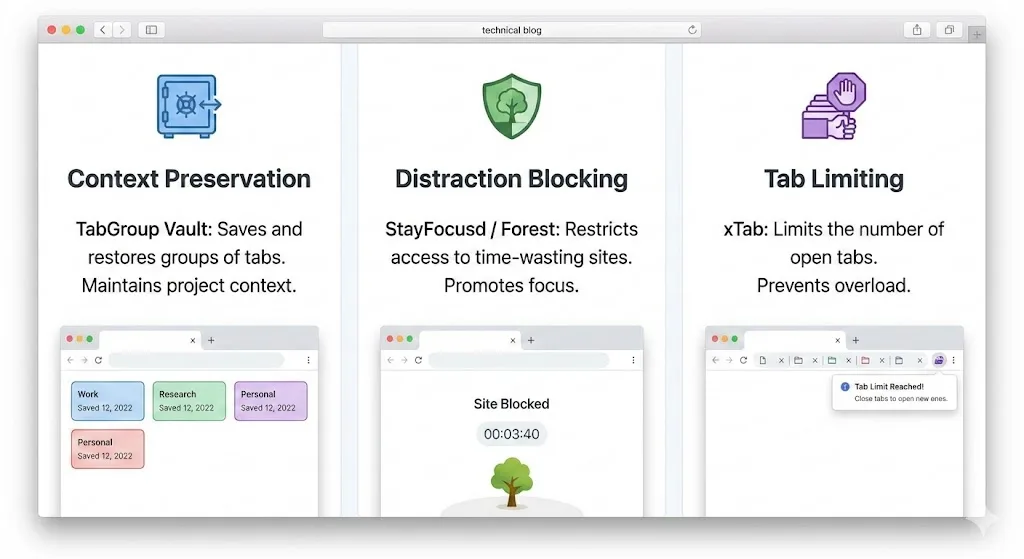
If you have ADHD, you already know that your browser is both your most powerful tool and your most dangerous trap. The same hyperfocus that lets you deep-dive into a topic for hours also means you surface with 40 tabs open, no idea which ones matter, and a growing sense that you lost the thread of what you were originally doing.
This is not a character flaw. It is how ADHD interacts with an environment designed for infinite branching. Every link is an invitation to a new thread. Every search result opens three more questions. The browser does nothing to help you maintain a coherent path through information. It just keeps opening tabs.
The result is a set of challenges that standard productivity advice does not adequately address:
- Tab overwhelm. Too many tabs creates visual noise that makes it harder to focus on any single one. The tab bar becomes a wall of indistinguishable favicons.
- Out of sight, out of mind. If you close a tab, it stops existing in your mental model. This makes closing tabs feel risky, so you keep everything open as a memory aid.
- Hyperfocus scatter. During a hyperfocus session, you open dozens of tabs on a topic. When the session ends, you have a mess of tabs with no organization and no way to distinguish the important ones from the rabbit holes.
- Context loss. Switching between tasks means losing your mental model of what you were doing. Rebuilding that model is exhausting and sometimes impossible.
The tools in this article address these specific challenges. They are not about discipline or willpower. They are about building an environment that works with your brain instead of against it.
Category 1: Context Preservation
The most impactful thing you can do for ADHD browser management is to solve the "out of sight, out of mind" problem. If you can save your current context and trust that it will be there when you come back, closing tabs stops being scary. Closing tabs is what creates space to focus.
TabGroup Vault
TabGroup Vault saves snapshots of your Chrome tab groups. Click save, and every tab, every group, and every color label is captured. Close everything. When you need to come back, restore the snapshot and your entire context reappears exactly as it was.
For ADHD brains, this addresses the core anxiety: if I close this, I will lose it. You will not. It is saved. You can close it. The free tier gives you 5 snapshots, which is enough to maintain a few different contexts (work, personal project, research rabbit hole) without keeping them all open simultaneously.
TabGroup Vault
Save and restore Chrome tab groups with one click. Addresses the ADHD challenge of "out of sight, out of mind" by making tab closure reversible. Free: 5 snapshots. Pro ($29 one-time): unlimited snapshots, bulk restore, Google Drive backup, 5 Chrome profiles, dark theme.
The key insight is that TabGroup Vault does not ask you to organize before you save. You can be in the middle of a chaotic hyperfocus session with 30 messy tabs, hit save, and deal with the organization later (or never). The safety net exists regardless of how tidy your tabs are.
Chrome Tab Groups (Built-in)
Chrome's built-in tab groups provide visual structure that ADHD brains benefit from. Color-coding and labeling groups creates visual anchors in the tab bar. Instead of 40 identical-looking tabs, you see three or four colored blocks with names. Your eyes can find what they need faster, and the act of collapsing a group physically reduces visual clutter.
The limitation is that Chrome does not save groups permanently. But when paired with TabGroup Vault, you get both the visual organization and the persistence.
Category 2: Distraction Blocking
Distraction blocking tools create friction between you and the sites that pull your attention away. They do not make distraction impossible -- they just make it inconvenient enough that the automatic reach for social media or news sites gets interrupted.
StayFocusd
StayFocusd lets you set a daily time allowance for specific websites. Once you hit your limit, those sites are blocked for the rest of the day. The "Nuclear Option" blocks everything except a whitelist for a set period, which is useful during deep work sessions.
What makes StayFocusd ADHD-friendly is that it makes the blocking hard to undo. The settings page has a deliberate friction mechanism: to change your limits, you have to wait or complete a challenge. This is important because ADHD impulse control issues mean you might disable a blocker the moment it blocks something. StayFocusd anticipates this.
Forest
Forest grows a virtual tree while you stay focused. If you visit a blocked site, your tree dies. The gamification element provides a positive reinforcement loop (growing trees, building a forest over time) rather than a purely punitive one. For ADHD brains that respond well to visual rewards and streaks, Forest can be more motivating than a simple blocker.
Category 3: Tab Limiters
Tab limiters enforce a maximum number of open tabs. When you hit the limit, you have to close a tab before you can open a new one. This is a blunt tool, but it directly addresses the hyperfocus scatter pattern where you open 30 tabs without realizing it.
xTab
xTab sets a hard cap on the number of tabs you can have open. When you try to open a tab beyond the limit, it either closes the oldest tab or shows a warning. You choose the limit. Some people set it to 20. Some to 10. The right number is whatever makes you pause before opening another tab.
Max Tabs
Similar to xTab, Max Tabs prevents you from opening tabs beyond a set limit. It is slightly more aggressive in its approach, immediately closing the oldest tab when you exceed the limit rather than giving a warning. This works well if you prefer automatic enforcement over manual decisions.
How These Tools Work Together
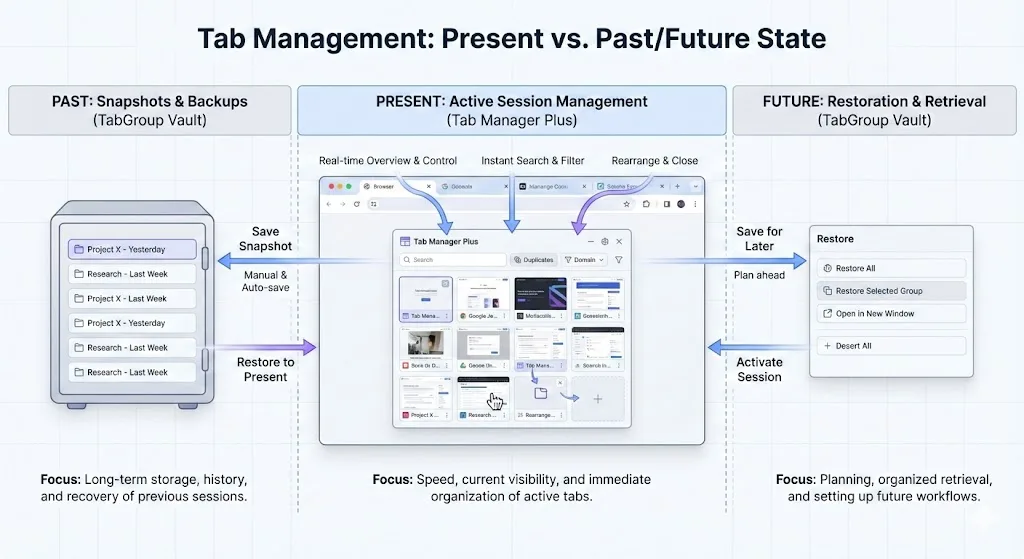
No single tool addresses every ADHD browser challenge. The power is in combining them:
| Challenge | Tool | How It Helps |
|---|---|---|
| Tab overwhelm | Chrome Tab Groups + xTab | Visual organization + hard limit on open tabs |
| Out of sight, out of mind | TabGroup Vault | Save context so closing tabs is safe |
| Hyperfocus scatter | TabGroup Vault + xTab | Save the mess, limit future accumulation |
| Distraction spirals | StayFocusd or Forest | Block or limit access to distracting sites |
| Context loss | TabGroup Vault | Restore previous working state instantly |
A practical starting point is TabGroup Vault plus one other tool. If distraction is your primary issue, pair it with StayFocusd. If tab accumulation is the main problem, pair it with xTab. You can always add more tools later, but starting with too many extensions can itself become overwhelming.
ADHD-Specific Workflow Strategies
Beyond tools, a few strategies make the browser more ADHD-compatible:
The "Parking Lot" Group
Create a tab group called "Parking Lot" or "Later" for tabs that catch your attention but are not related to your current task. When you feel the pull to go down a rabbit hole, drag the tab into the Parking Lot instead. This acknowledges the impulse without derailing your focus. Review the Parking Lot during a planned break or at the end of the day.
The Session Bookmark
Before you start working on something, save a snapshot of your current tabs. Think of it as a bookmark for your session. If you get distracted and your browser ends up in a completely different state, you can restore the snapshot and get back to where you were. This removes the penalty for distraction. You do not have to remember where you were because the snapshot remembers for you.
The Two-Window Split
Use two Chrome windows: one for your current task and one for everything else. Keep the task window in front. If you need to look something up that is not task-related, use the second window. This physical separation creates a visual cue about what you should be doing. When you catch yourself in the second window, that awareness is the first step to refocusing.
A Note on Self-Compassion
If you set up a system and do not follow it perfectly, that is fine. These tools exist to make things easier, not to create another source of guilt. Use what helps. Ignore what does not. Adjust as you learn what works for your brain. There is no right way to manage tabs, only the way that reduces friction for you.
What Does Not Work (and Why)
Some common productivity advice actively clashes with ADHD. Knowing what to skip saves time and frustration:
- "Just close tabs you don't need." This assumes you know which tabs you need, which requires a working memory that ADHD often compromises. Save first, then close.
- "Use bookmarks." Bookmarks are where tabs go to die. If you cannot see it, you will not remember it exists. Bookmarks work for neurotypical organization; for ADHD, they become a graveyard of good intentions.
- "Be more disciplined about opening tabs." This is like telling someone with poor eyesight to just look harder. The tool should accommodate the behavior, not the other way around.
- "Start each day with a clean browser." For ADHD, the context in your browser is part of your external memory. Wiping it daily means rebuilding your mental state from scratch every morning. Save your context instead.
Getting Started Without Getting Overwhelmed
If you have read this far and are feeling the urge to install five extensions right now, pause. Here is the minimum viable setup:
- Install TabGroup Vault. Save a snapshot of your current tabs right now. That is your safety net.
- Create one or two tab groups for your most important current tasks. Do not try to organize everything.
- Use it for a week. Just the save-and-restore workflow. See if it helps.
- Add one more tool if you identify a specific remaining problem (distraction, tab accumulation, etc.).
The goal is not a perfectly organized browser. The goal is a browser where you can find what you need, save what matters, and get back on track after the inevitable distractions. That is achievable, and it does not require perfection.