Sessions vs. Tab Groups: Understanding the Difference
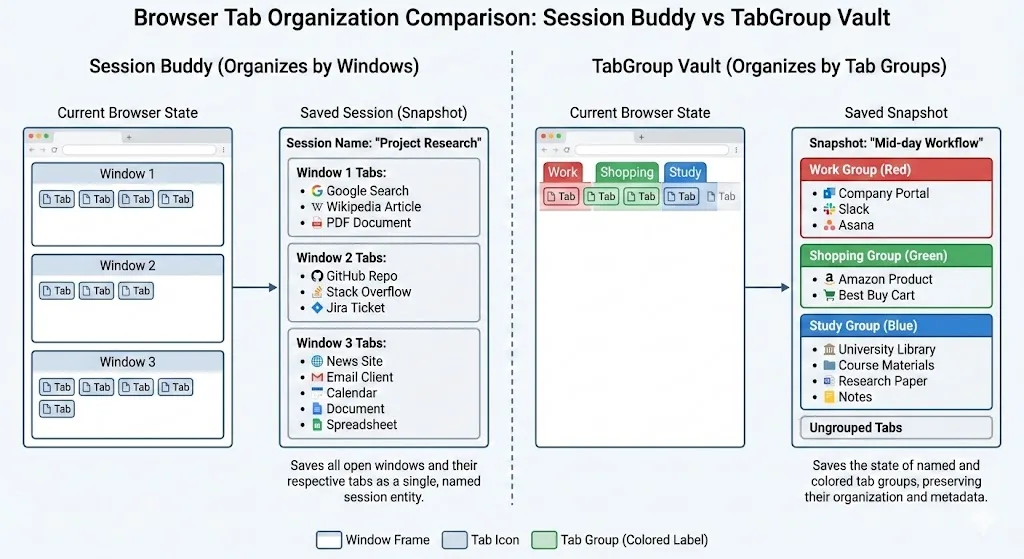
Before comparing these two extensions, it helps to understand the conceptual difference between a session and a tab group snapshot.
A session is a record of what windows and tabs you had open at a particular moment. Session Buddy thinks in terms of windows: "Window 1 had these 8 tabs, Window 2 had these 5 tabs." It logs sessions automatically over time and lets you name and save them manually.
A tab group snapshot is a record of your organized tab groups. TabGroup Vault thinks in terms of groups: "The 'Research' group (blue) had these 4 tabs, the 'Shopping' group (green) had these 3 tabs." It captures the organizational structure you built using Chrome's native grouping feature.
Both approaches save your tabs. But they preserve different layers of information, and that matters depending on how you organize your browser.
Feature-by-Feature Comparison
| Feature | TabGroup Vault | Session Buddy |
|---|---|---|
| Core Unit | Tab group snapshot | Browser session (windows) |
| Tab Group Support | Full -- names, colors, structure | Limited -- partial group data |
| Auto-Save | Manual snapshots | Automatic session logging |
| Session History | Snapshot timeline | Automatic session log with dates |
| Restore Accuracy | Full group structure restored | Windows and tabs restored, groups partially |
| Cloud Backup | Google Drive | None |
| Export | JSON, Drive | JSON, CSV, text, Markdown |
| Multi-Profile | Up to 5 profiles | No |
| Search | By snapshot name | Full-text search across sessions |
| Pricing | Free (5 snapshots) / $29 lifetime | Completely free |
| Privacy | Local-first, optional Drive | Local only |
Where Session Buddy Wins
Session Buddy has real strengths that make it the better choice for certain workflows:
Automatic Session Logging
Session Buddy records your browser sessions over time without you doing anything. This creates a running history you can look back through. If you forgot to manually save before closing Chrome, Session Buddy likely captured what you had open. TabGroup Vault relies on manual snapshots -- you have to remember to save.
Completely Free
Session Buddy has no paid tier, no feature gates, and no limits. Every feature is available to every user at no cost. For users who do not want to pay for any browser extension, this is a decisive advantage.
Rich Export Options
Session Buddy can export your saved sessions as JSON, CSV, plain text, or Markdown. This flexibility is useful if you need to share your tab lists with others or import them into other tools. TabGroup Vault exports as JSON and backs up to Google Drive.
Full-Text Search
Session Buddy lets you search across all your saved sessions by URL or page title. If you remember visiting a page but cannot recall when, you can search your entire history of saved sessions to find it.
When Session Buddy Is the Right Choice
If you organize your browser by windows rather than tab groups, want automatic background logging, and prefer a completely free tool, Session Buddy is an excellent choice. It has been reliable for years and its session-based model works well for window-centric workflows.
Where TabGroup Vault Wins
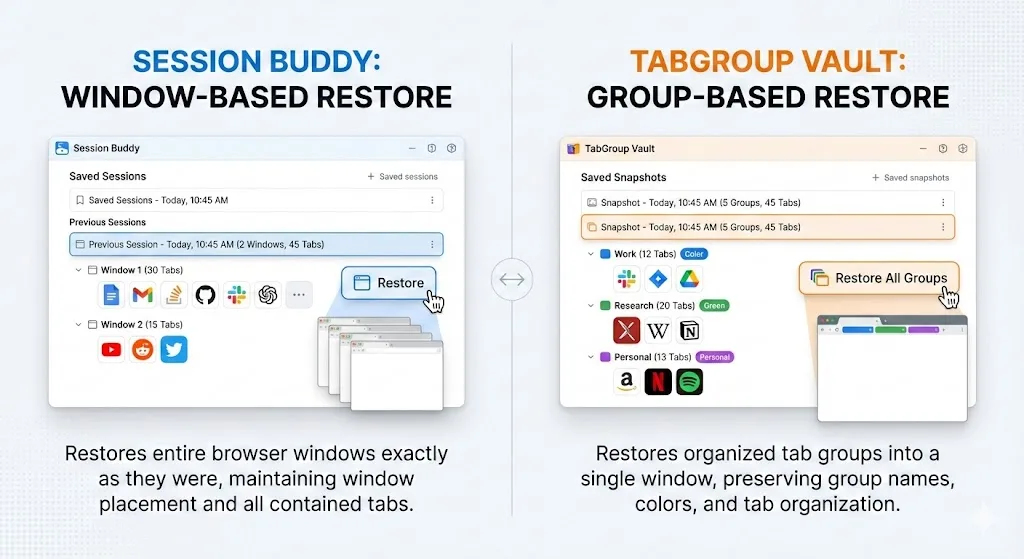
Tab Group Fidelity
This is the core differentiator. If you use Chrome tab groups -- named, color-coded collections of related tabs -- TabGroup Vault is the only tool that fully preserves and restores that structure. Session Buddy was designed before Chrome had tab groups, and while it has added some group support, it does not reliably capture and reconstruct the full group layout.
For users who invest time in organizing tabs into named groups, losing that organization during a save/restore cycle defeats the purpose of saving in the first place.
Cloud Backup
TabGroup Vault can sync your snapshots to Google Drive. This means your saved workspaces survive Chrome reinstalls, profile resets, and even switching to a new computer. Session Buddy stores everything locally in the browser with no cloud backup option. If your Chrome profile is corrupted or reset, Session Buddy's data goes with it.
Multi-Profile Support
TabGroup Vault's Pro tier supports up to five Chrome profiles, which is valuable for users who maintain separate profiles for work, personal use, freelance clients, and so on. Session Buddy operates within a single profile.
One-Time Pricing
While Session Buddy is free (which is a genuine advantage), TabGroup Vault's pricing model is worth noting for its fairness: $29 once, forever. There is no subscription creep, no annual renewal, and no feature that gets locked behind a higher tier later. You pay once and own the full Pro feature set permanently.
Different Tools for Different Workflows
The honest truth is that these extensions are not direct competitors as much as they are solutions for different user profiles:
The Window Organizer: You use multiple Chrome windows to separate contexts. Window 1 is work email and docs. Window 2 is your development environment. Window 3 is research. You do not use tab groups much. Session Buddy is built for exactly this workflow.
The Tab Group Organizer: You use a single window (or a few) with multiple named, color-coded tab groups. Your "Research" group is blue, your "Docs" group is green, and your "Testing" group is red. TabGroup Vault is built for exactly this workflow.
Some users fall in between, using both windows and tab groups. In that case, the deciding factor is usually which layer of organization you care more about preserving.
TabGroup Vault Quick Facts
Free tier: 5 snapshots, full tab group preservation
Pro: $29 one-time -- unlimited snapshots, Google Drive backup, 5 profiles
Focus: Chrome tab group backup and restore
Privacy: Local-first, Drive sync is optional
Can You Use Both Together?
Absolutely. There is no conflict between running Session Buddy and TabGroup Vault simultaneously. Some users appreciate having Session Buddy for its automatic background logging -- a safety net that captures sessions they forgot to save -- alongside TabGroup Vault for deliberate workspace snapshots they want to preserve with full group fidelity.
If you want both automatic session logging and reliable tab group backup, running both extensions is a practical solution. They use different storage mechanisms and do not interfere with each other.
The Verdict
Session Buddy is a mature, free, reliable session manager that works well for window-based organization and automatic logging. It has earned its reputation and its large user base.
TabGroup Vault is a focused tool for users who have adopted Chrome's tab groups as their primary organizational method and need those groups preserved reliably. Its cloud backup and group-aware design fill a gap that Session Buddy was not designed to address.
If you use tab groups, try TabGroup Vault's free tier alongside Session Buddy. You will quickly see whether the group-preservation workflow adds value to your setup. If it does, the $29 Pro upgrade is a straightforward investment. If it does not, Session Buddy on its own may be all you need.