Session Buddy is better if you need to search and manage a long-running archive. OneTab is quicker when you want today's Tab pile out of the way and easy to reopen. Start with what you need back: a searchable history or a tidy list.
What the interfaces actually look like
The difference is easy to see. Session Buddy puts your open Windows and saved collections in one library. OneTab arranges saved Groups and links in a folder tree.
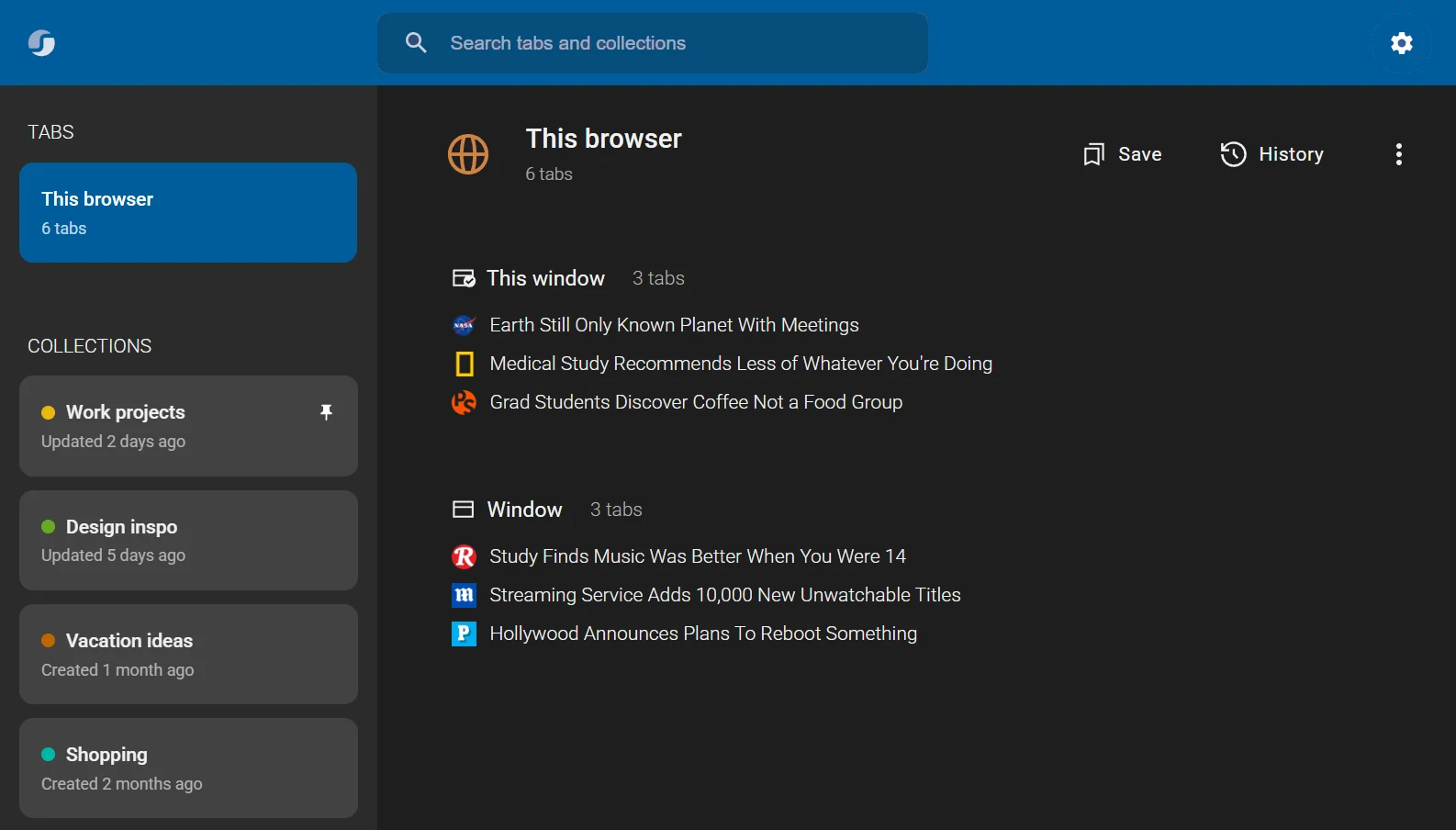
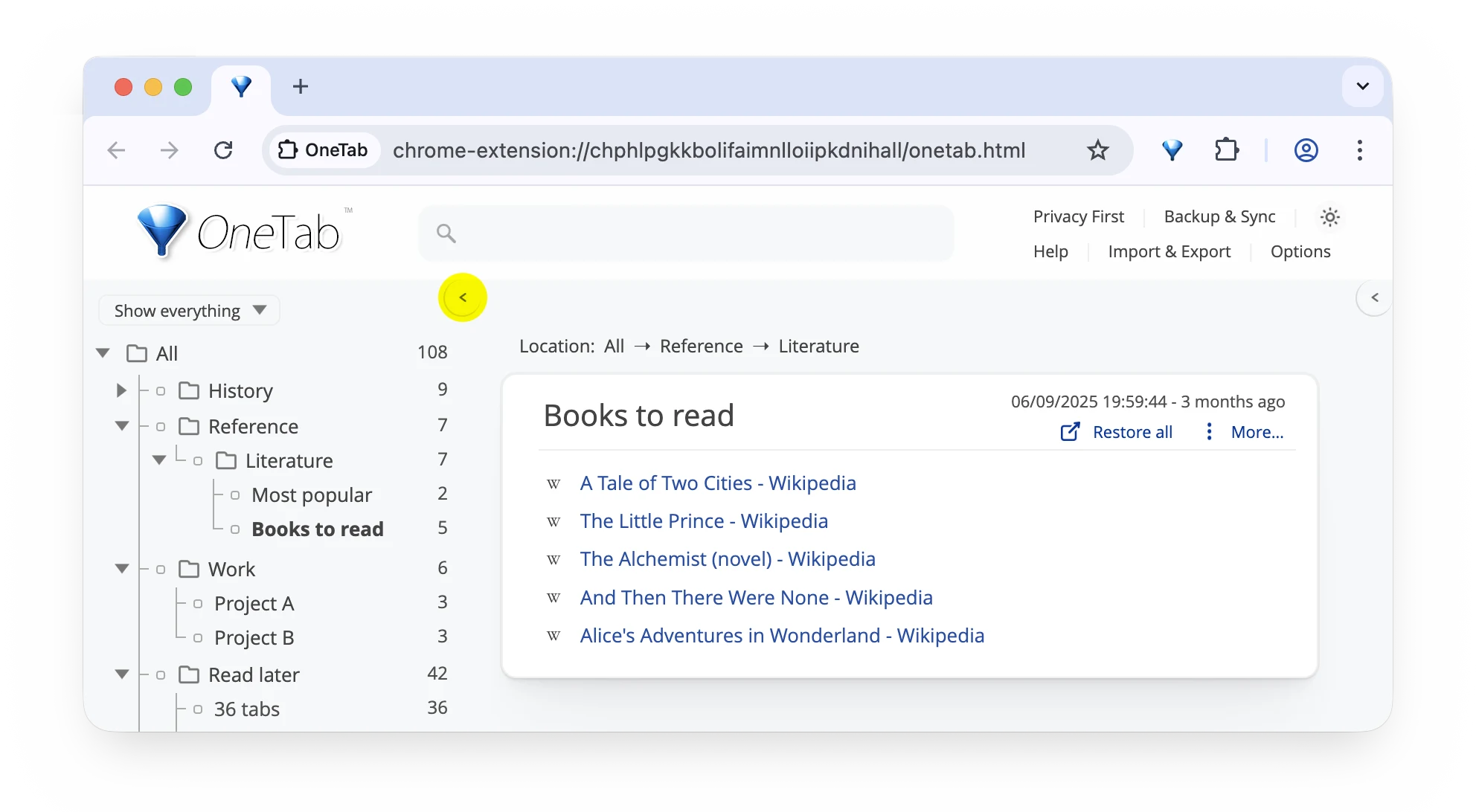
Session Buddy vs OneTab at a glance
| Need | Session Buddy | OneTab |
|---|---|---|
| Main job | Save, search, organize, and restore Sessions | Convert open Tabs into a compact list |
| Organization | Sessions, collections, Tabs, and bookmarks | Tab lists with folders, tasks, and notes |
| Import and export | Multiple text and structured formats | Tab-list import and export |
| Sync between computers | Not available | Encrypted sync is listed as coming soon |
| Where Tab data stays | On your device | On your device unless you choose “share as web page” |
| Best fit | A maintained Session archive | Fast Tab cleanup and later reopening |
On paper, both extensions clear an overloaded Window and reopen Tabs later. In use, they feel quite different. Session Buddy is a browser-history workspace. OneTab is closer to an inbox for Tabs.
The core difference: archive versus action
Session Buddy is built for looking backward as well as saving forward. It gives you a place to search current Tabs, bookmarks, saved collections, and previous Sessions. If you often think, "I had that page open last Tuesday," its archive model is useful.
OneTab is built around a single immediate action. You click its button, the Tabs in the current Window move into a list, and the active Window becomes lighter and quieter. You can restore one link, restore the whole list, rename a Group, or export the URLs. It asks less of you because it stores less context around the Tabs.
That makes OneTab faster for cleanup, but Session Buddy more capable for retrieval. A short-lived reading pile is a natural OneTab job. A month-long research project with multiple saved states is a more natural Session Buddy job.
What if the Groups themselves are the work?
Session Buddy and OneTab focus on Sessions and lists. TabGroup Vault keeps the names, colors, Tabs, and layout of native Chrome Tab Groups. Try the save-and-restore flow below.
Where Session Buddy fits
Session Buddy is for people who want history and structure around saved browsing. It can restore a full Session or selected Tabs, search open Tabs and bookmarks, organize collections, make local backups, and import or export saved material.
That makes it useful when yesterday's browser state matters. You can keep research Sessions, find a Tab from an older collection, and export saved material instead of treating every cleanup as a one-off event.
Session Buddy does not sync between devices. Its data stays local by default, so exports and backups matter if losing the browser profile would hurt.
Session Buddy is the better choice when
- You regularly search for Tabs from older Sessions.
- You want saved Sessions, bookmarks, open Tabs, and collections in one interface.
- You restore selected Windows or selected Tabs rather than every saved item.
- You want several export formats for archiving or sharing a Session outside the extension.
Where Session Buddy gets in the way
More capability means more interface. If your whole workflow is "hide these Tabs now and reopen a few tonight," a Session library can feel like extra machinery. The lack of current cross-device sync also means you should understand its backup and export options before making it the only copy of important research.
Where OneTab fits
OneTab starts with a simpler move: send open Tabs to a list. It is a good fit when you have too many Tabs open, want the Window quiet again, and expect to reopen some or all of the list later.
OneTab also has folders, tasks, notes, and import/export. Its help page lists encrypted cloud sync as coming soon. Tab URLs stay on your device unless you intentionally share a list as a web page.
The list model is the point. It is quick and legible, but it does not preserve a native Chrome Tab-Group layout with Group names and colors.
OneTab is the better choice when
- You want the quickest path from a crowded Window to a readable list.
- You usually restore individual links instead of recreating a complete browser Session.
- You prefer a small set of obvious actions over a searchable Session-management interface.
- You want to move a plain URL list between tools without preserving much browser context.
Where OneTab gets in the way
A list is not a snapshot of your workspace. If the meaning lived in which Window a Tab belonged to, how a Chrome Group was named, or which color marked a project, flattening those Tabs loses that meaning. OneTab can still be the right tool, but rebuilding organization later becomes your job.
Which one is safer for important Tabs?
Neither product removes the need for a backup plan. "Stored locally" describes where data lives; it does not guarantee that the data will survive an extension uninstall, browser-profile reset, disk failure, or accidental clearing of site and extension data.
With Session Buddy, use its backup and export tools and test that you can read the result. With OneTab, export any list you could not afford to reconstruct, and understand the difference between a local list and the optional share-as-a-web-page action. A private work URL should not be placed on a shared page just because the page is convenient.
For either extension, the best test is practical: save a disposable Window, export or back it up, close it, and restore it before trusting the workflow with something important.
Do either of them reduce Chrome memory use?
Both can reduce the number of live pages in a Window, which may reduce the resources those pages consume. OneTab makes this effect especially visible because its primary action closes the open Tabs and replaces them with a list. Session Buddy lets you save a Session and close what you no longer need.
Do not choose between them based on a universal RAM-saving percentage. The result depends on the pages, Chrome's own Memory Saver behavior, extensions, media, and whether restored Tabs load immediately. Choose the restore model you prefer; treat lower resource use as a useful consequence of closing Tabs, not a guaranteed benchmark.
Pick based on the restore job
| Your real need | Best starting point | Why |
|---|---|---|
| Find a Tab from an old work Session | Session Buddy | Search and Session history are central to the product. |
| Clear 40 Tabs and reopen a handful later | OneTab | The Tab-to-list action is fast and direct. |
| Keep a research archive with exports | Session Buddy | Collections, search, bookmarks, backups, and export offer more depth. |
| Keep a lightweight reading queue | OneTab | A compact list may be all the structure you need. |
| Restore named, color-coded Chrome Groups | TabGroup Vault | It restores the Group names, colors, and Tabs together. |
If none of those rows describes your workflow, compare the wider field in our Chrome Session manager guide. It covers tools aimed at automatic history, manual snapshots, cloud workspaces, and native Tab Groups.
When TabGroup Vault is the better fit
Chrome Tab Groups create a different problem: you may want the Group names and colors back, not just the URLs.
TabGroup Vault saves that layout. The free tier includes 10 snapshots. Pro adds unlimited snapshots, Google Drive backup, auto-save on Window close, multi-Window restore, and support for multiple Chrome profiles. Use it when rebuilding your Groups would take longer than finding the Tabs again.
A writer might keep separate Groups for sources, drafts, references, and publishing. A developer might split documentation, tickets, logs, and test environments. You can recover the URLs, but rebuilding all those Groups takes time.
Can you use Session Buddy and OneTab together?
You can, although most people should start with one and add the other only when a recurring gap appears. Session Buddy can act as the longer-term Session archive while OneTab handles temporary reading piles. The overlap is manageable, but two extensions also create two places to look for a missing Tab.
The same rule applies to TabGroup Vault: pair tools by job, not because more backups automatically mean less risk. A sensible combination is one broad safety net plus one deliberate workspace tool. Test the restore path and write down which tool owns which kind of saved work.
Privacy and backup deserve separate checks
Local storage can be a privacy benefit, but local-only data is still vulnerable to profile damage, browser resets, or accidental clearing. Read each product's current privacy page, then test its export or backup path before relying on it for important work.
OneTab's optional sharing feature is also worth understanding. Sharing a list as a web page is intentionally different from keeping the list local. Do not publish a shared list that contains private or work-sensitive URLs.
Verdict
Pick Session Buddy for a searchable Session and bookmark library. Pick OneTab for the quickest route from open Tabs to a restorable list.
If you work in named Chrome Tab Groups, neither extension restores those Groups in the same way. Use the demo above, then test TabGroup Vault's free tier with one real project before changing your regular setup.
Product features change, so check the Session Buddy site and OneTab site before making a long-term choice.